

May 30, 2026
Project Management Software in 2026: A Practical Buying and Workflow Guide
Most teams buy project management software to fix visibility. The real decision is how work should move, who owns state, and what the system must prove in practice.
Project management software usually gets purchased after the team is already frustrated. Work is scattered across chat threads, spreadsheets, inboxes, and half-updated documents. Nobody wants another tool, but everyone wants fewer status meetings.
Teams think the problem is task tracking. The real problem is operating state: who owns the work, what changed, what is blocked, what is waiting on another team, and what evidence proves the project is moving.
That changes the conversation. You are not buying a prettier checklist. You are choosing the workflow layer your team will use to plan, coordinate, escalate, report, and learn.
The practical question is not which project management software has the longest feature list. It is which system your team can run every week without creating a second shadow process in Slack, email, or spreadsheets.
Table of contents
- Project management software is an operating system, not a task list
- Why teams outgrow spreadsheets, chat, and status meetings
- The core architecture of project management software
- What works: choosing around workflows instead of features
- What fails: common implementation mistakes
- A practical vendor evaluation model for 2026
- Implementation workflow: from pilot to production
- Integrations, automation, and AI in project management software
- Metrics that prove the system is working
- Where saasrow.com fits in your software buying workflow
Project management software is an operating system, not a task list
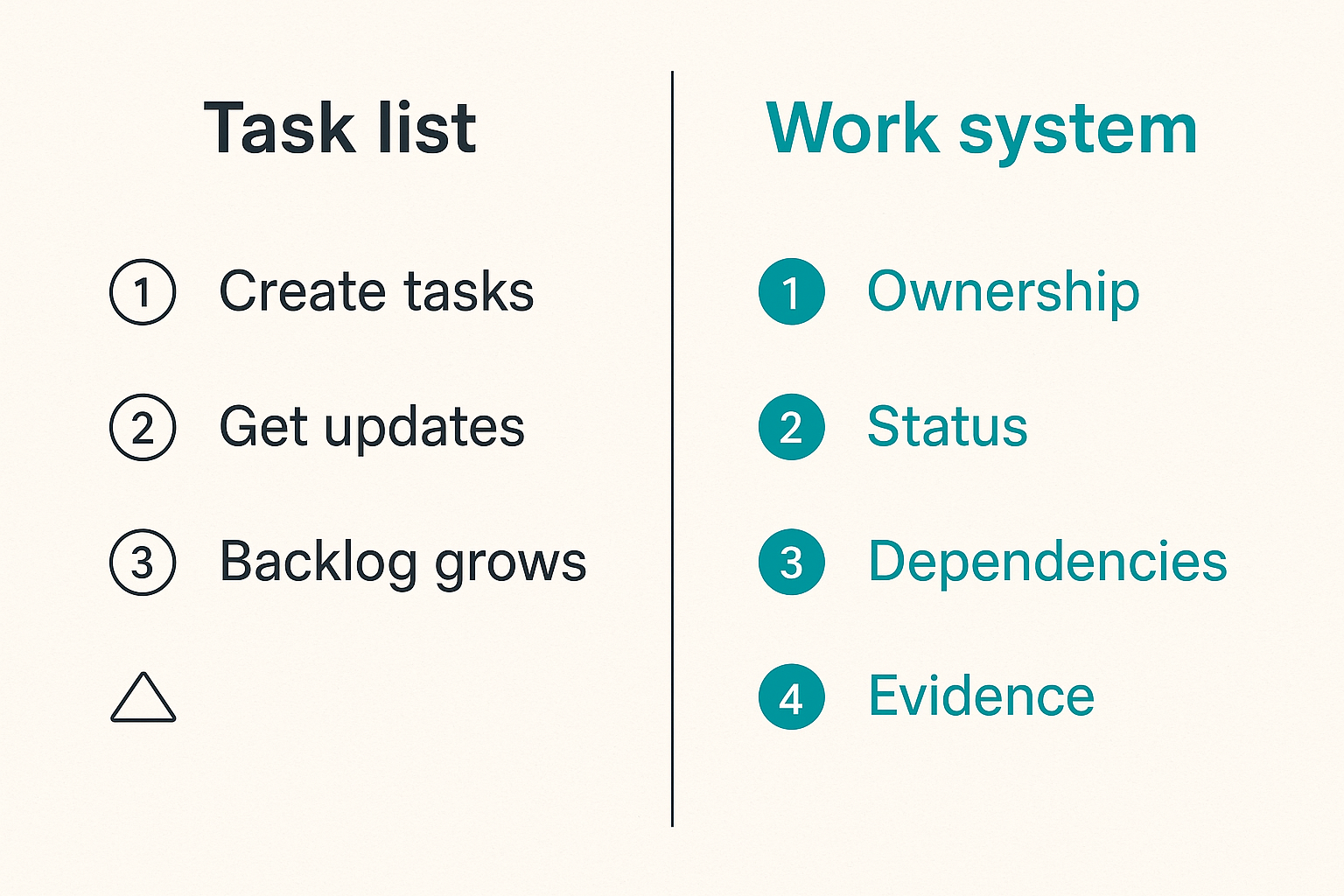
The first decision is workflow ownership
The mistake teams make is starting with features: boards, timelines, forms, dashboards, AI summaries, templates, and reporting. Those matter, but they are not the first-order decision.
The first-order decision is ownership. Who is responsible for keeping the system true?
If everyone can create work but nobody owns intake, the backlog becomes a junk drawer. If managers ask for updates in meetings but do not trust the tool, the tool becomes theater. If executives want dashboard confidence but teams are not trained on status rules, the dashboard is fiction.
A useful way to think about project management software is this: it is a shared ledger for work. Like any ledger, it only works if entries are timely, structured, and trusted.
Practical rule: If the project management system is not trusted enough to replace a status meeting, it is not the system of record yet.
Ownership usually needs three layers:
- A workflow owner who defines how work moves.
- Project or team leads who maintain current state.
- Contributors who update tasks at the point of work, not at the end of the week.
Small teams can combine these roles. Larger teams need them separated. Either way, the role design matters more than the brand name on the invoice.
The second decision is how work changes state
Bad implementations treat status as decoration. A task moves from to do to doing to done because someone dragged a card. That is not enough.
Good implementations define what state means. Ready means requirements are clear. In progress means an owner is actively working. Blocked means a specific dependency is preventing progress. Done means acceptance criteria were met and evidence exists.
That changes the conversation because status becomes operational, not cosmetic. A blocked item triggers escalation. A stale in-progress item triggers review. A done item can be audited later.
For most SaaS and small business teams, the initial status model should be boring:
- New
- Ready
- In progress
- Blocked
- In review
- Done
- Archived
Do not start with twelve custom states unless the process truly needs them. Complexity feels mature in a demo and becomes expensive in production.
Why teams outgrow spreadsheets, chat, and status meetings
Visibility breaks before effort breaks
Teams rarely outgrow spreadsheets because spreadsheets are useless. They outgrow them because spreadsheets do not enforce workflow behavior.
A sheet can list tasks. It cannot reliably manage ownership changes, dependency alerts, comment context, attachments, approvals, recurring work, permission boundaries, or historical state without heavy manual discipline. Chat is worse. It is fast, but it is not durable.
What breaks in practice is not effort. People are often working hard. What breaks is visibility into where effort is going and whether it is producing the expected outcome.
You see the pattern:
- Two people work on overlapping tasks.
- A blocker is mentioned in chat and forgotten.
- A due date changes but the client-facing timeline does not.
- A manager builds a reporting spreadsheet from stale updates.
- The team spends Friday reconstructing what happened since Monday.
Project management software should reduce reconstruction work. If it does not, the tool is just another place to copy updates.
Coordination costs become invisible
Coordination cost is the tax paid when people need to discover what is true before doing useful work.
In small teams, the tax hides inside quick messages. In growing teams, it becomes meetings, duplicated work, missed handoffs, and slow decisions. The cost is rarely visible as a line item, which is why teams tolerate it too long.
Related reading from our network: independent operators face a similar problem when they manage offers, delivery, payment, and retention without a stable workflow, which is why this guide to freelance jobs online in 2026 is useful adjacent reading for teams thinking about repeatable work systems.
The point is not that every process needs enterprise tooling. The point is that repeated coordination should be converted into explicit workflow. If the same question is asked every week, the system should answer it by default.
Practical rule: Repeated coordination questions should become fields, states, views, or automations. If they stay as chat messages, they will keep returning.
The core architecture of project management software
Tasks, projects, portfolios, and programs
Most confusion starts with the basic object model. Teams use the same word for different levels of work.
A task is a unit of work with an owner and expected outcome. A project is a collection of tasks driving a defined result. A portfolio is a group of projects managed for priority, capacity, or investment. A program is an ongoing strategic effort that may contain multiple projects over time.
Here is a practical comparison:
| Work level | Typical owner | Useful when | Common mistake |
|---|---|---|---|
| Task | Individual contributor | Work needs clear accountability | Making tasks too vague |
| Project | Project lead or manager | Work has a deadline and outcome | Treating projects as endless buckets |
| Portfolio | Department lead | Leaders need priority and capacity visibility | Reporting only activity, not tradeoffs |
| Program | Executive or senior owner | Work spans quarters and teams | Hiding dependencies across projects |
Small teams may only need tasks and projects. Mid-size SaaS teams often need projects and portfolios. Larger organizations usually need all four, but not all on day one.
The mistake teams make is adopting the tool vendor's hierarchy without mapping it to how the business actually makes decisions.
Status, dependencies, owners, and evidence
Four fields decide whether project management software becomes useful or decorative:
- Status: what state the work is in.
- Dependency: what other work or decision it relies on.
- Owner: who is accountable for the next movement.
- Evidence: what proves progress or completion.
Evidence is underrated. A done task should point to something: a shipped feature, a signed document, a resolved ticket, a published page, a customer approval, a merged pull request, or a file.
Without evidence, done becomes subjective. Subjective done creates rework.
A simple configuration pattern:
Task type: Customer onboarding task
Required fields: owner, due date, account, status, blocker reason
Done condition: customer handoff completed and notes attached
Escalation: blocked for more than 2 business days
Review view: onboarding manager weekly queue
This is not glamorous. It is useful. Project management is mostly the discipline of making the boring parts reliable.
What works: choosing around workflows instead of features
Start with three repeatable workflows
A buying process becomes clearer when you evaluate software against real workflows instead of abstract feature names.
Pick three workflows your team runs often. For a SaaS company, that might be:
- Product feature request to release.
- Customer onboarding from signed contract to activation.
- Marketing campaign from idea to published assets.
For a professional services team, it might be:
- Sales handoff to delivery.
- Client approval loop.
- Monthly reporting package.
Run each workflow through the candidate tools. Do not just watch the vendor demo. Build the workflow yourself, assign owners, create dependencies, add approval steps, and produce a report.
What works is boring evidence:
- Can a new request enter the right queue?
- Can the owner see what to do next?
- Can a manager see what is blocked?
- Can leadership see project health without manual slides?
- Can the team find the history later?
If the answer is yes for your real workflows, the tool is a serious candidate. If the answer is only yes after five workarounds, keep looking.
Match views to operating roles
Different roles need different views of the same underlying work.
Contributors need a short list of owned work. Project leads need status, blockers, dependencies, and due dates. Executives need outcomes, risk, capacity, and tradeoffs. Clients may need a filtered external view.
The same system should support those views without duplicating the work record.
| Role | Best default view | Primary question |
|---|---|---|
| Contributor | My tasks or sprint board | What should I do next? |
| Project lead | Timeline, board, or dependency view | What is at risk? |
| Department head | Portfolio dashboard | Where is capacity going? |
| Executive | Outcome and risk summary | What tradeoff needs a decision? |
| Client or stakeholder | Limited shared view | What is the current status? |
When teams force everyone into the same board, the board gets overloaded. When teams create separate boards for every audience, truth fragments.
The better pattern is one shared data model with role-specific views.
What fails: common implementation mistakes
Tool sprawl creates competing sources of truth
The most common failure mode is not choosing the wrong project management software. It is letting five systems all pretend to own the same work.
A sales handoff lives in CRM. Delivery tasks live in a project tool. Technical work lives in an issue tracker. Approvals happen in email. Status reporting happens in slides. Customer notes live in a document.
Some of that may be necessary. The failure is not multiple tools. The failure is unclear boundaries.
A practical boundary map should answer:
- Where is customer truth stored?
- Where is work execution stored?
- Where is technical implementation stored?
- Where are documents and evidence stored?
- Where does leadership reporting come from?
If nobody can answer those questions, the team will create manual bridges. Manual bridges are where updates get lost.
Practical rule: Multiple tools are fine. Multiple tools claiming to be the source of truth for the same workflow are not fine.
Automation without ownership makes noise faster
Automation is useful when it reduces manual state movement. It is harmful when it creates more things nobody owns.
Common bad automations include:
- Every form submission creates a task without triage.
- Every Slack message with a keyword creates noise.
- Every overdue item pings a channel nobody monitors.
- Every status change triggers emails that users ignore.
- Every template creates thirty default tasks regardless of project size.
The result is predictable: people mute notifications, stop trusting due dates, and move real coordination back to chat.
What fails is treating automation as a substitute for process design. Automation should encode a process that already works manually. It should not invent process for a team that has not agreed on ownership.
A good automation has four parts:
- Trigger: what event starts it.
- Condition: when it should run.
- Action: what state changes.
- Owner: who reviews the result if it fails.
No owner means no automation. That is a harsh rule, but it prevents mess.
A practical vendor evaluation model for 2026
Compare by operating constraints
Project management software buying gets messy because teams compare tools as if every organization has the same constraints. They do not.
A design agency needs client approvals and asset review. A SaaS product team needs roadmap planning, engineering integration, and release visibility. A small operations team may need recurring checklists and deadline control. A leadership team may care most about portfolio reporting.
Start with constraints:
- Team size and growth plan.
- Remote, hybrid, or office-heavy work.
- Client-facing versus internal-only work.
- Need for approvals or compliance history.
- Integration with CRM, support, finance, docs, or code tools.
- Budget per user and admin capacity.
- Security requirements and permission complexity.
That changes the conversation from best tool to best fit. There may not be one best option. There is usually a best fit for your current operating model and the next stage you expect to reach.
Use a weighted scorecard
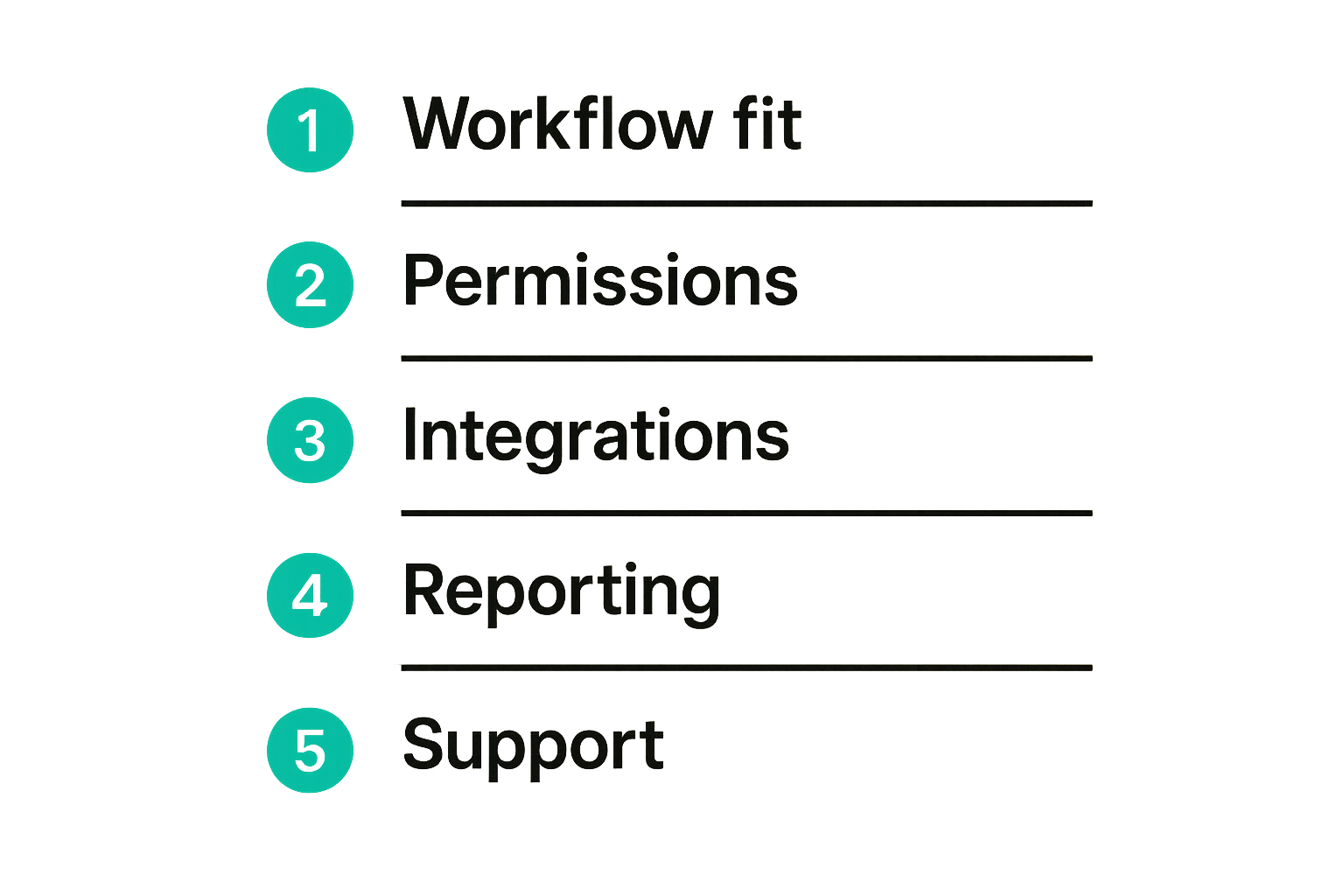
A scorecard prevents the loudest stakeholder from turning preference into strategy. Keep it simple. Weight the criteria that matter for your team.
| Criterion | Weight | What to test |
|---|---|---|
| Workflow fit | 30% | Can the tool run your three core workflows? |
| Usability | 20% | Can regular users update work without admin help? |
| Reporting | 15% | Can managers see risk and progress without manual cleanup? |
| Integrations | 15% | Can it connect to systems that own adjacent state? |
| Permissions | 10% | Can you separate internal, external, and leadership views? |
| Total cost | 10% | Does pricing scale reasonably with users and guests? |
Use this during trials. Score each tool after hands-on testing, not after a demo.
The mistake teams make is letting edge-case features dominate the decision. If a feature matters once per quarter but usability matters daily, weight them accordingly.
Implementation workflow: from pilot to production
Run a controlled pilot
Do not roll out a new project management system to the whole company on Monday and expect discipline by Friday. That creates cleanup work and resentment.
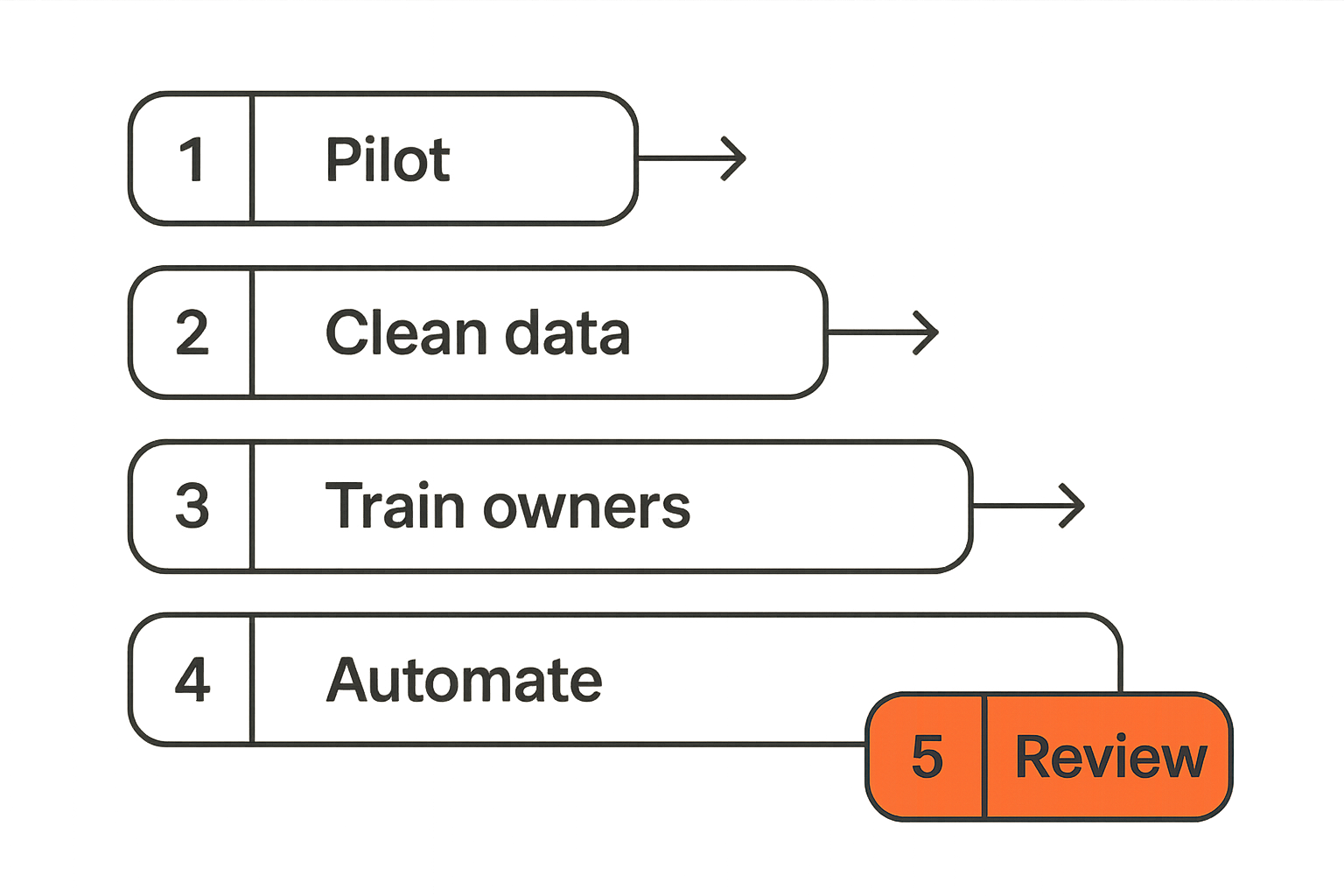
Run a controlled pilot with one team or one cross-functional workflow. Choose work that is real enough to expose problems but contained enough to fix quickly.
A practical pilot sequence:
- Define the workflow. Write down intake, status states, owners, dependencies, evidence, and reporting needs.
- Configure the minimum system. Avoid overbuilding templates before users touch the tool.
- Import only useful active work. Do not migrate years of stale tasks.
- Train users on rules, not features. Explain what status means and when updates are expected.
- Run the workflow for two to four weeks. Watch where users leave the system.
- Review failure points. Fix fields, views, permissions, and automations.
- Decide whether to expand, adjust, or reject the tool.
This is slower than a big launch, but it produces better information. A pilot should reveal whether the software fits the way the team works or whether the team would need unnatural behavior to make it work.
Roll out with governance, not enthusiasm
Enthusiasm gets people to create accounts. Governance keeps the system useful after the launch week.
Governance does not need to be bureaucratic. It needs to answer basic questions:
- Who can create new projects?
- Which templates are approved?
- What fields are required?
- What does each status mean?
- How often are dashboards reviewed?
- Who cleans up stale work?
- Who approves new integrations or automations?
For small teams, a one-page operating guide is enough. For larger teams, you may need admin roles, naming conventions, permission groups, and monthly audits.
Related reading from our network: product and operations teams thinking about how software gets interpreted by AI systems may find this adjacent guide on answer engine optimization product management useful because it frames product work as structured information, not just publishing.
The same logic applies here. If your work system has clean structure, humans and AI assistants can reason about it. If it is messy, every summary becomes suspect.
Integrations, automation, and AI in project management software
Integrations should move state, not just notifications
Integrations are often oversold. A Slack integration that posts every update is not workflow integration. It is noise distribution.
A useful integration moves state between systems with clear boundaries. For example:
- A CRM closed-won deal creates an onboarding project.
- A support ticket escalated to product creates a triaged product request.
- A merged pull request updates an engineering task.
- A signed approval moves a campaign into production.
- A completed project sends summary data to reporting.
The key is direction and authority. Which system is allowed to create, update, or close work? What happens if two systems disagree? Who reviews failed syncs?
For API-driven teams, look for webhooks, audit logs, permission controls, reliable retries, and idempotent operations where available. Even if you are not building custom integrations today, these capabilities matter when the company grows.
AI is useful when the data model is clean
AI features in project management software can be genuinely useful. Summaries, risk detection, meeting note extraction, task creation, and natural-language search can save time.
But AI does not fix bad operating data. If owners are missing, statuses are vague, and comments contain decisions that never changed fields, AI will summarize confusion faster.
The practical question is: what structured data does the AI have access to?
Good AI use cases include:
- Summarizing project updates from current tasks and comments.
- Identifying stale work based on status age.
- Drafting follow-up tasks from meeting notes.
- Highlighting dependency risk across projects.
- Searching historical decisions and evidence.
Weak AI use cases include replacing ownership, guessing priority without business context, or generating large task lists nobody asked for.
Related reading from our network: the same structural issue shows up in AI citation and content workflows, where Pi AI and answer engine optimization depends on crawlable, well-organized information rather than loose keyword targeting.
The lesson for project management software is similar: AI works better when the system underneath is explicit.
Metrics that prove the system is working
Measure flow, not busyness
A project management tool can make a team look very active while still hiding slow delivery. Task counts, comments, and notifications are not enough.
Measure flow. Flow metrics show whether work is moving through the system at a healthy pace.
Useful metrics include:
- Cycle time: how long work takes from start to completion.
- Lead time: how long work takes from request to completion.
- Blocked time: how long work sits waiting on dependencies.
- Aging work: how many tasks are stale in each status.
- Throughput: how much completed work exits the system over time.
- Reopen rate: how often done work returns because acceptance was unclear.
You do not need an advanced analytics stack to start. Even a weekly view of blocked items and aging work can change behavior.
The mistake teams make is using dashboards to impress leadership instead of improving decisions. A dashboard should trigger action. If it never changes what someone does, it is decoration.
Build a review cadence
Project management software only stays useful when teams review it regularly. Not constantly. Regularly.
A simple cadence:
- Daily or every other day: contributors update active work.
- Weekly: team leads review blocked and stale work.
- Biweekly: managers review capacity, delivery risk, and cross-team dependencies.
- Monthly: leadership reviews portfolio tradeoffs and strategic alignment.
- Quarterly: admins review templates, fields, permissions, and automations.
This cadence prevents decay. Work systems rot when nobody removes stale projects, updates templates, or questions fields that no longer matter.
Practical rule: Every dashboard needs a meeting, decision, or owner attached to it. Otherwise it will become a screenshot factory.
Keep review meetings short and tied to system data. If the meeting requires everyone to verbally recreate the dashboard, the data is not trusted yet.
Where saasrow.com fits in your software buying workflow
Use independent comparison thinking
Choosing project management software is partly a product decision and partly an operating decision. You need to understand features, but you also need to understand fit, workflow tradeoffs, implementation burden, and how the tool will change daily behavior.
That is where practical software research helps. A good comparison does not ask which tool is most popular. It asks which tool fits a specific team shape, workflow type, and operating constraint.
For buyers, the useful workflow is:
- Define the problem in operational terms.
- Identify the workflows that must improve.
- Shortlist tools that match the workflow shape.
- Test with real work, not sample data.
- Score the tools against weighted criteria.
- Decide ownership before rollout.
- Review after implementation and adjust.
saasrow.com is built for readers who want practical articles, guides, and insights about software and productivity. The goal is not hype. The goal is to help teams compare tools, improve workflows, and choose software wisely.
If you are evaluating project management software in 2026, treat the tool as part of your operating architecture. The UI matters, but the workflow rules matter more. The best system is the one your team can keep true when work gets busy.
Try saasrow.com
For practical articles, guides, and insights about software and productivity, visit Try saasrow.com. Use it as a starting point when comparing project management software and building better workflows.