

August 31, 2026
Best Business Software for Small Teams in 2026: A Practical Buying Workflow
A practical guide to choosing the best business software for small teams in 2026 by workflow fit, integrations, ownership, rollout risk, support, and consolidation.
The best business software for small teams is not the tool with the longest feature list. It is the tool your team can actually run without turning every process into a side project.
That sounds obvious until renewal season arrives. The CRM has half the customer notes. The project management tool has tasks nobody trusts. The chat app has decisions buried in channels. Finance exports CSVs from three systems because no one agreed where the truth lives.
Teams think the problem is choosing better software. The real problem is designing a smaller, clearer operating system for the business.
That changes the conversation. Instead of asking, “Which app has the most features?” the practical question is, “Which tools should own which workflows, which data should move between them, and who is accountable when something breaks?” In 2026, small teams cannot afford software stacks that require enterprise admin overhead. They need tools that reduce handoffs, make work visible, and survive growth without creating tool sprawl.
Table of contents
- Why the best business software for small teams is a workflow decision
- Start with the core operating stack
- Compare software by ownership, not feature count
- Best business software for small teams by workflow area
- Integration quality is where software decisions succeed or fail
- Build a buying workflow before you book demos
- What works when small teams implement business software
- What fails: common small-team software mistakes
- Security, permissions, and continuity cannot be afterthoughts
- Where saasrow.com fits in the software decision
Why the best business software for small teams is a workflow decision

The tool is not the operating model
The mistake teams make is treating software as a substitute for operating discipline. A new project management platform will not decide how work gets prioritized. A CRM will not define qualification rules. A finance tool will not fix unclear approval authority.
Software can enforce, accelerate, and make visible the way a team works. It cannot invent the workflow for you.
A useful way to think about it is this: every business tool should answer three questions.
- What work does this tool own?
- What data does this tool own?
- What decisions should happen inside this tool?
If the answer is vague, the tool becomes a shared dumping ground. If the answer is specific, the tool becomes operational infrastructure.
Practical rule: Do not buy software until you can describe the workflow it will own in one sentence.
For example, “We need better collaboration” is not a workflow. “We need a single place where client deliverables move from request to approval to delivery” is a workflow. That distinction matters because it changes evaluation criteria. You stop comparing generic features and start testing whether the tool supports the way work actually moves.
The hidden cost is coordination
Small teams often underestimate coordination cost because everyone is close to the work. A founder can still ask someone in chat. A customer success lead can still remember the account context. A finance person can still patch the month-end process manually.
Then the team adds customers, contractors, approvals, and recurring work. Suddenly the informal system breaks. People ask the same questions twice. Files are stored in the wrong place. Work disappears between tools. Nobody knows whether the spreadsheet, ticket, email thread, or task is current.
What breaks in practice is not usually the software itself. It is the lack of clear handoff rules between tools.
The best business software for small teams reduces coordination load. It does not just add another interface. It makes status, ownership, and next actions easier to see without a meeting.
Related reading from our network: teams that work remotely face a similar handoff problem when control moves between people, tools, and screens; this guide on remote team control workflows is a useful adjacent lens.
Start with the core operating stack
The six categories most small teams actually need
A small team does not need a tool for every department function. It needs a practical stack that covers the core operating loop: sell, deliver, communicate, bill, document, and measure.
Here is the simplest useful map.
| Workflow area | Typical software category | Primary job | System-of-record risk |
|---|---|---|---|
| Customer pipeline | CRM | Track leads, accounts, deals, renewal context | Sales notes scattered across email and chat |
| Delivery work | Project management | Track tasks, owners, deadlines, approvals | Work status becomes meeting-dependent |
| Communication | Chat and meetings | Discuss work, coordinate quickly, escalate blockers | Decisions disappear in channels |
| Knowledge | Docs and wiki | Store procedures, decisions, policies, templates | People rely on memory instead of process |
| Finance | Accounting, invoicing, expense tools | Invoice, reconcile, approve spend, report cash | Month-end depends on manual cleanup |
| Reporting | Dashboards, BI, spreadsheets | Show operating metrics and exceptions | Everyone argues over different numbers |
This table is intentionally boring. That is the point. Most small teams do not fail because they lack exotic software. They fail because these basic categories overlap badly or are not owned.
The practical question is not whether you need all six on day one. It is which category is currently causing the most operational drag.
What should stay manual longer than expected
Not every workflow should become software immediately. Small teams often automate uncertainty too early. They build elaborate automations around a process that is still changing weekly.
Keep a workflow manual when:
- The owner changes every week.
- The approval rules are still being negotiated.
- The volume is low enough that manual review creates useful learning.
- The cost of a mistake is high and the process has not stabilized.
- The data model is unclear.
This is especially true for early sales qualification, bespoke customer onboarding, vendor evaluation, and strategic planning. A spreadsheet, checklist, or lightweight task board may be enough until the pattern repeats.
Practical rule: Automate stable workflows. Document unstable workflows. Do not confuse the two.
The goal is not to avoid software. The goal is to avoid locking a bad process into software and then calling it scale.
Compare software by ownership, not feature count
Assign a system of record before you buy
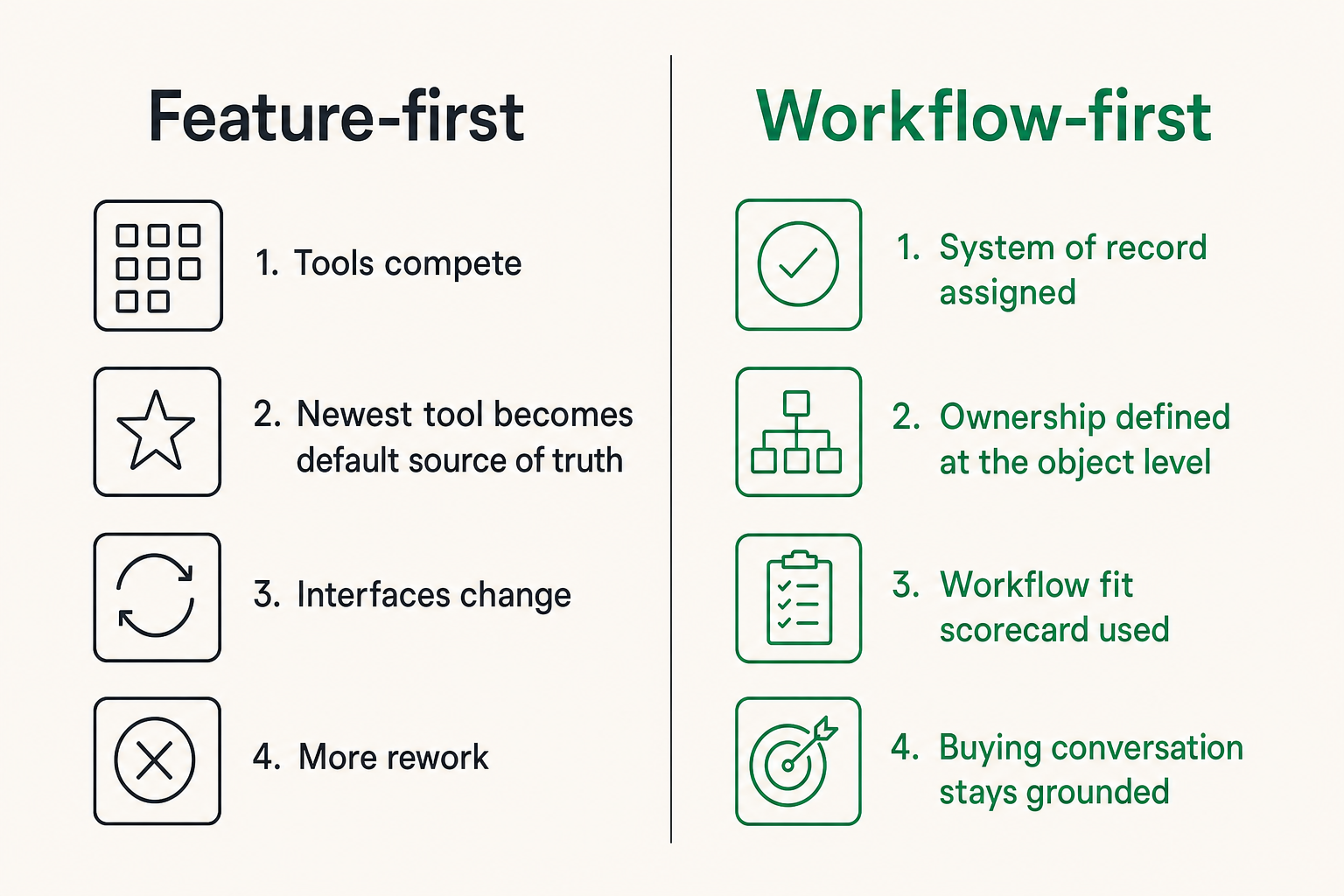
A system of record is where the team agrees the truth lives. Without that decision, tools compete.
For a customer address, is the CRM the source of truth or the billing system? For project status, is it the task board or the client email thread? For contract terms, is it the document folder or the finance system? These questions sound administrative, but they decide how much rework your team creates.
Before choosing software, define ownership at the object level:
- Customer: CRM or billing platform?
- Deal stage: CRM or spreadsheet?
- Project deadline: project management tool or calendar?
- Invoice status: accounting platform or payments processor?
- Employee access: identity provider or individual apps?
- SOPs: wiki or document folders?
The mistake teams make is letting the newest tool become the default source of truth because it has the cleanest interface. Interfaces change. Ownership rules should not.
If you are comparing vendors, review sites can help, but they should feed a buying process rather than replace one. A structured approach like this guide to software review sites and SaaS buying workflow is more useful than reading star ratings in isolation.
Use a workflow fit scorecard
A scorecard keeps the buying conversation grounded. It also prevents the loudest stakeholder from turning a niche preference into a company-wide requirement.
Use a simple 1–5 score for each area:
| Evaluation area | What to test | Why it matters |
|---|---|---|
| Workflow fit | Can the tool run your real process with minimal workarounds? | Prevents buying a polished tool that does not match execution |
| Data ownership | Does it support your system-of-record model? | Reduces duplicate records and reconciliation work |
| Integration quality | Are native integrations reliable and configurable? | Prevents manual copy-paste between systems |
| Permission model | Can roles match real responsibilities? | Limits access risk without blocking work |
| Reporting | Can managers see exceptions and trends? | Reduces status meetings and spreadsheet cleanup |
| Administration | Can a non-specialist manage it? | Matters when the team has no full-time ops admin |
| Exit options | Can you export useful data cleanly? | Reduces lock-in and migration pain |
A high feature count should not compensate for weak workflow fit. For small teams, administrative simplicity often beats enterprise configurability.
Practical rule: If a tool needs a part-time administrator before it creates value, it may be too heavy for the team you have now.
Best business software for small teams by workflow area
Sales and customer management
For sales and customer management, the best business software for small teams usually has to do four things well: track pipeline, preserve customer context, support follow-up, and connect to billing or support.
A small team CRM should be easy enough that sales notes are entered while the conversation is still fresh. If reps, founders, or account owners avoid the CRM because it feels slow, the team will rebuild customer memory in inboxes and chat.
Look for:
- Clear lead, account, and deal objects.
- Email and calendar capture that does not create noise.
- Simple pipeline customization.
- Renewal or follow-up reminders.
- Exportable customer data.
- Integration with billing, support, forms, or marketing tools.
Be careful with advanced automation. Lead scoring, complex routing, and multi-stage nurture flows can be useful, but only when the inputs are reliable. If the team cannot maintain clean stages and contact data, automation amplifies the mess.
Projects, tasks, and delivery
Project management software is where small teams often over-customize. They create too many boards, statuses, labels, views, and templates. Then nobody knows which view matters.
The practical question is: can a teammate open the tool and understand what is due, who owns it, and what is blocked?
Strong project software for small teams usually supports:
- One default intake path for new work.
- Clear owners and due dates.
- Statuses that reflect actual handoffs.
- Templates for recurring projects.
- Comments tied to tasks, not lost in chat.
- Lightweight reporting for overdue work and bottlenecks.
What fails is turning the project tool into a management theater dashboard. If the board looks impressive but the team still asks for status in meetings, the tool is not doing its job.
Related reading from our network: content and publishing teams deal with the same review-lane problem, and this piece on project management software for AI-powered content workflows maps those approval states well.
Finance, documents, and internal operations
Finance and internal operations tools need a different buying lens. The user experience matters, but correctness matters more.
For finance, test how the tool handles:
- Invoice creation and payment status.
- Recurring billing or subscriptions.
- Expense approvals.
- Bank reconciliation.
- Tax categories and reporting exports.
- Permissions for accountants or outside bookkeepers.
For documents and knowledge, the danger is fragmentation. Contracts live in one folder. SOPs live in another. Policies are in a doc nobody can find. Meeting notes exist, but decisions are not summarized.
Small teams should define document classes:
- Legal documents.
- Customer deliverables.
- Internal SOPs.
- Strategy and planning docs.
- Templates.
- Meeting notes.
Each class should have a home, naming convention, and owner. This sounds basic, but it prevents the “Does anyone have the latest version?” tax that quietly burns hours every week.
Integration quality is where software decisions succeed or fail
APIs, native integrations, and automation layers
Integrations are not a bonus feature anymore. They are the plumbing of a small business software stack.
But not all integrations are equal. A logo on an integration marketplace does not mean the sync supports your workflow. It may only send basic records. It may be one-way. It may fail silently. It may require an expensive plan. It may not support custom fields.
Evaluate integrations in layers:
- Native integration: easiest to maintain, but often less flexible.
- Automation platform: useful for lightweight routing and alerts.
- API integration: powerful, but requires technical ownership.
- Manual export/import: acceptable only for low-frequency workflows.
The mistake teams make is assuming integration exists because two vendors say they “connect.” You need to test the actual data movement.
Ask:
- Which fields sync?
- Is the sync one-way or two-way?
- How often does it run?
- What happens when a record fails?
- Can duplicates be merged?
- Are custom fields supported?
- Is historical data included?
- Who receives error alerts?
Related reading from our network: engineering teams see the same state and handoff issues in collaboration tooling, including screen sharing; this article on screen sharing in software development is a useful parallel for thinking beyond the visible UI.
Data sync rules that prevent messy operations
Data sync needs rules. Otherwise every integration becomes a quiet source of corruption.
Define these rules before rollout:
- Create rule: Which tool can create a new record?
- Update rule: Which tool can change core fields?
- Conflict rule: What happens when two tools disagree?
- Deletion rule: Is data deleted, archived, or marked inactive?
- Error rule: Who reviews failed sync events?
For example, if customer email changes in the billing system, should it update the CRM? Maybe yes. If a sales rep changes a billing contact in the CRM, should it update the accounting tool? Maybe not. Context matters.
Practical rule: A two-way sync without field ownership rules is not automation. It is a future cleanup project.
Small teams should start with fewer integrations and stronger rules. Add complexity only after the core record flow is stable.
Build a buying workflow before you book demos
A practical eight-step evaluation sequence
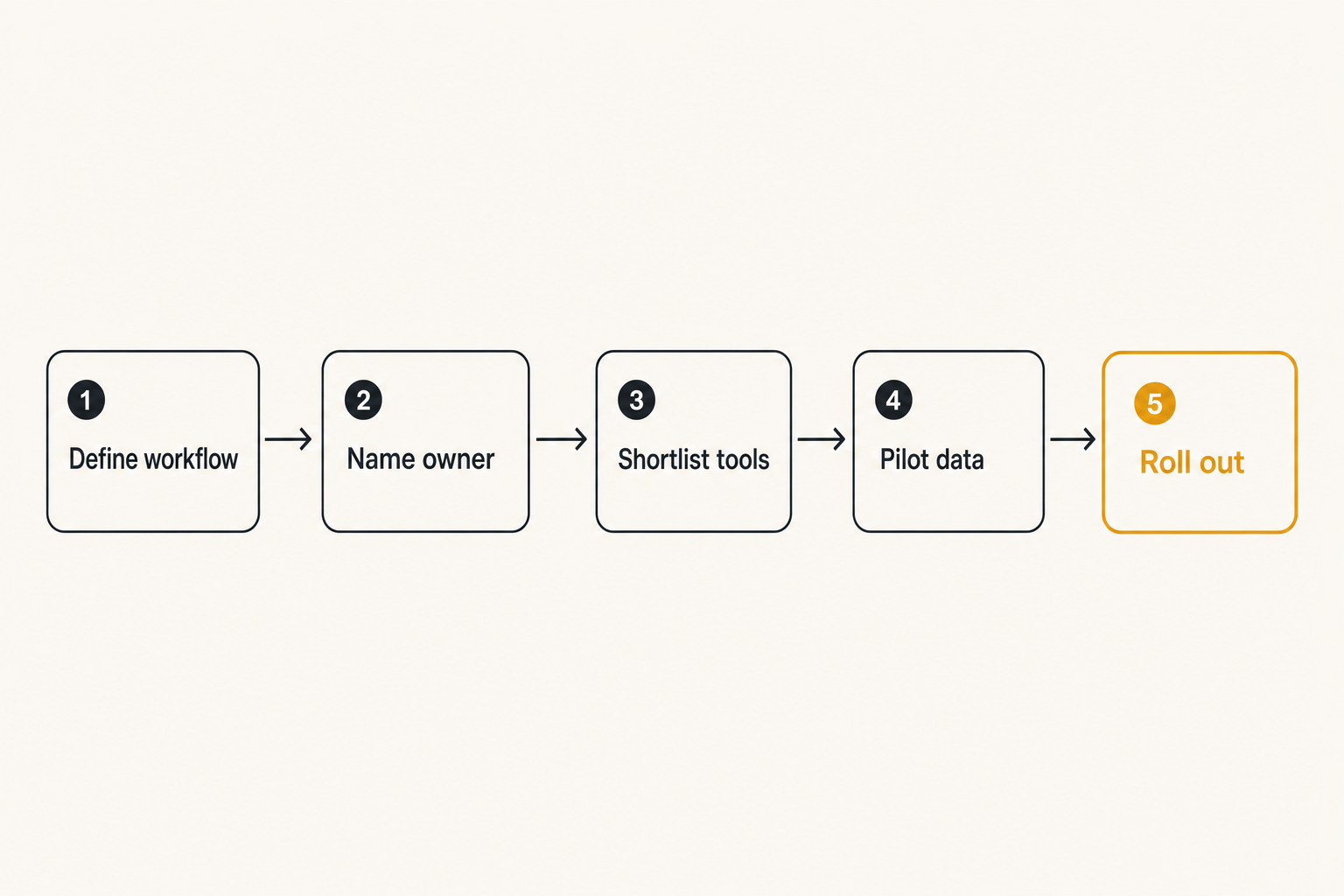
The best software buying process is short, but not casual. You want enough structure to avoid expensive mistakes without creating procurement theater.
Use this sequence:
- Define the workflow. Write the exact process the tool should own.
- Name the owner. Assign one person accountable for evaluation and rollout.
- List current pain. Capture where time, errors, delays, or confusion happen now.
- Set must-have requirements. Limit these to operational needs, not preferences.
- Shortlist three to five tools. Use review sites, peer recommendations, and vendor docs.
- Run scenario-based demos. Test your workflow, not the vendor’s ideal demo path.
- Pilot with real data. Use a small but representative team or process.
- Decide rollout, defer, or reject. Document why so the decision survives turnover.
This sequence works because it forces the team to decide what “better” means before seeing polished interfaces.
If you are worried about tool sprawl, the buying workflow should include consolidation checks from the beginning. This guide on avoiding software tool sprawl is a useful companion when your stack already has overlapping apps.
How to run demos without getting sold the roadmap
Vendor demos are designed to make the product look coherent. Your job is to make the demo operational.
Send the vendor a scenario before the call. For example:
- A lead comes in from a form, becomes a qualified opportunity, receives a proposal, signs, and becomes a customer.
- A client request enters the queue, gets scoped, assigned, reviewed, approved, and delivered.
- An invoice is created, sent, partially paid, reconciled, and reported.
Ask the vendor to walk through that scenario live. Do not accept screenshots for critical workflows. Ask what happens when something goes wrong: duplicate records, missed deadlines, failed payments, permission changes, or bad data imports.
What works is asking operational questions:
- “Where would my team see the exception?”
- “Who can override this field?”
- “Can this approval be skipped?”
- “How do we export this history?”
- “What breaks if we downgrade plans?”
What fails is letting the vendor spend 40 minutes on dashboards you will not use for six months.
What works when small teams implement business software
Start with one painful workflow
Small teams should not roll out a full stack transformation unless they have no alternative. A better approach is to start with one painful workflow and make it visibly better.
Good starting points include:
- Lead intake to first response.
- Customer onboarding.
- Weekly project planning.
- Invoice approval.
- Support escalation.
- Contract storage and renewal reminders.
The first workflow should be important enough to matter but contained enough to fix. If the team sees less confusion within two weeks, adoption becomes easier.
A useful rollout plan looks like this:
| Phase | Goal | Output |
|---|---|---|
| Week 1 | Map the workflow | Owner, statuses, fields, handoffs |
| Week 2 | Configure the tool | Templates, permissions, integrations |
| Week 3 | Pilot with real work | Feedback, fixes, missing rules |
| Week 4 | Make it default | Training, documentation, old-process shutdown |
The old-process shutdown is important. If email, spreadsheet, and new tool all remain acceptable, the team will choose whatever is easiest in the moment. That creates fragmentation.
Create defaults, not suggestions
Adoption improves when the team has defaults. Not preferences. Not “best practices” hidden in a doc. Defaults.
Examples:
- Every new customer starts from the same onboarding template.
- Every task needs an owner and due date.
- Every sales opportunity must have a next step.
- Every vendor contract goes into one folder structure.
- Every internal request starts from one form.
- Every approval happens in the tool, not in chat.
Defaults reduce decision fatigue. They also make exceptions visible. If a workflow needs a different path, the team can discuss it intentionally instead of improvising silently.
Practical rule: A software rollout is not complete until the old workaround is removed or clearly marked as an exception.
Documentation should be short and close to the work. A one-page workflow guide beats a long internal manual nobody reads.
What fails: common small-team software mistakes
Buying for edge cases
The most common buying error is optimizing for rare edge cases. Someone asks, “But what if we need multi-region approval routing for a partner project next year?” The team then buys a heavier tool, pays more, and spends months configuring around a scenario that may never happen.
Edge cases matter, but they should not dominate the decision unless they are frequent, expensive, or legally required.
Use this filter:
- Does this happen at least monthly?
- Does it affect revenue, compliance, or customer trust?
- Would a manual exception be risky or expensive?
- Does solving it complicate the common workflow?
If the answer is mostly no, do not let it drive the purchase.
The best business software for small teams handles the common path cleanly and leaves room for manual exceptions. It does not force every process into enterprise complexity before the team needs it.
Ignoring adoption and administration
A tool can be technically good and operationally wrong. This happens when the software assumes more administration, training, or process maturity than the team has.
Watch for these warning signs:
- Only one person understands the configuration.
- Every workflow requires custom fields and automation rules.
- Reporting depends on perfect data entry.
- Permissions are too broad because roles are hard to manage.
- Users need frequent reminders to update records.
- The tool creates more meetings instead of fewer.
What breaks in practice is trust. Once people stop trusting a tool, they create a shadow process. The shadow process may be a spreadsheet, private notes, chat threads, or a personal task manager. That is how small teams end up paying for software and still running the business manually.
When adoption is weak, do not immediately blame the team. Check whether the workflow is unclear, the tool is too heavy, or the old process was never shut down.
Security, permissions, and continuity cannot be afterthoughts
Minimum controls for a small team stack
Security for small teams does not need to be theatrical. It needs to be consistent.
Minimum controls should include:
- Single sign-on where practical.
- Multi-factor authentication for critical tools.
- Role-based access for finance, customer, and admin systems.
- Shared inboxes or team-owned accounts instead of personal ownership for critical workflows.
- Regular access reviews.
- Clear rules for contractors and temporary users.
- Data export capability.
The practical question is not “Do we have enterprise security?” It is “Can we prevent obvious access mistakes, recover from turnover, and prove who can see sensitive data?”
Small teams often delay permission design because everyone is trusted. Trust is not the issue. Continuity is the issue. If a teammate leaves, changes role, or loses a device, the business still needs control.
Offboarding and continuity planning
Offboarding is where messy stacks reveal themselves. If a person owns the billing login, automation account, reporting spreadsheet, and key customer notes, the business has an operational dependency disguised as a person.
Create a simple continuity checklist:
- Which tools does this person administer?
- Which workflows do they own?
- Which automations run under their account?
- Which documents or folders did they control?
- Which customers, vendors, or partners rely on them?
- Which credentials need rotation?
This is also where export quality matters. A tool that looks great during onboarding but traps data during transition is a risk. Before committing, test whether you can export records, attachments, comments, and history in a usable format.
For niche or specialized tools, the same workflow-first lens applies. Even when evaluating a category-specific platform, such as this practical buying workflow for Aztec software in 2026, the key question remains whether the tool fits the operating model rather than just the category label.
Where saasrow.com fits in the software decision
Use practical comparisons to reduce buying noise
SaaS buying is noisy because every vendor describes itself in the language of outcomes: faster, simpler, smarter, more productive. Some of that may be true. It is also not enough.
Small teams need comparisons that connect software to workflow reality: ownership, integrations, permissions, rollout effort, reporting, support, and renewal risk. That is the lens saasrow.com is built around.
The useful role of a software guide is not to declare one universal winner. Different teams have different constraints. A five-person agency, a local services firm, a SaaS startup, and a remote consulting team may all need different defaults.
The better job is to help buyers ask sharper questions before they spend money.
When comparing the best business software for small teams, use a simple final check:
- Does this tool remove a recurring operational problem?
- Is the workflow owner clear?
- Will the team know where the truth lives?
- Can the tool connect to the rest of the stack?
- Can a small team administer it without constant consulting?
- Is there a clean exit path if needs change?
If the answer is yes, the software is probably worth a serious pilot. If the answer is no, the product may still be good, but it is not the right operating choice yet.
Try saasrow.com
saasrow.com is for readers who want practical articles, guides, and insights about software and productivity. If you are comparing the best business software for small teams, start with a workflow-first view and keep the stack accountable to how your team actually works.