

August 17, 2026
Capterra Alternatives in 2026: A Practical Buying Workflow for SaaS Teams
Capterra alternatives are not just review sites. Learn how to build a practical software buying workflow using multiple sources, scoring, demos, trials, and rollout checks.
Choosing software from a review site looks simple until the shortlist starts fighting back.
You search for a category, sort by rating, open ten tabs, skim a few reviews, and suddenly every product looks both excellent and risky. The pricing pages do not line up. The reviews emphasize features you may not use. The “best” tool depends on team size, implementation effort, integrations, and support quality.
That is why many teams search for capterra alternatives. Teams think the problem is finding another directory with different rankings. The real problem is building a software buying workflow that does not outsource judgment to a single review platform.
In 2026, the practical question is not “Which site replaces Capterra?” It is “Which sources, checks, and decision steps reduce buying risk for our workflow?” That changes the conversation.
Table of contents
- Why teams look for capterra alternatives
- What capterra alternatives should actually do
- The main types of capterra alternatives
- A practical comparison table for software buyers
- Build a better buying workflow than one-site research
- How to evaluate reviews without being misled
- What works when comparing SaaS tools
- What fails with capterra alternatives
- Category-specific checks for productivity teams
- How saasrow.com fits into the buying process
Why teams look for capterra alternatives
The mistake teams make is assuming dissatisfaction with Capterra means they need a single replacement. In practice, they usually need a stronger buying system.
Capterra is useful for discovery. It can show categories, vendors, review volume, broad sentiment, and adjacent products. But discovery is only one layer of software selection. A small business choosing scheduling software, a SaaS team buying product analytics, and an operations group replacing a help desk all need different evidence.
A useful way to think about capterra alternatives is to treat them as inputs, not authorities. You are assembling a decision file: market options, workflow requirements, pricing exposure, rollout risk, user feedback, vendor responsiveness, and integration constraints.
Review fatigue is a workflow issue
Review fatigue happens when every product has hundreds of positive reviews and the negative reviews are too generic to act on. “Hard to use” may mean poor onboarding, bad information architecture, weak permissions, or a buyer who chose the wrong product.
The practical question is: can the review help you predict your team’s experience?
If not, it is background noise. Useful reviews describe company size, role, use case, implementation path, missing features, support experience, and what changed after adoption.
Practical rule: Do not compare average ratings until you have compared use cases.
One directory cannot answer every buying question
A directory can help you discover vendors. It cannot fully answer whether the tool fits your data model, approval process, compliance needs, reporting workflow, budget cycle, or team habits.
That does not make directories useless. It means they sit early in the process. They are weak when teams use them as the whole process.
Many software buyers now combine directories, search results, peer communities, product documentation, hands-on trials, and practical guides. If you want a broader map of review platforms, saasrow.com has a companion guide to the best software review sites in 2026 that is useful before narrowing your evaluation stack.
The buyer needs evidence, not just rankings
Rankings compress messy tradeoffs into a simple list. That is helpful for scanning and dangerous for buying.
A tool ranked third may be better for a ten-person agency than the tool ranked first. A niche product may have fewer reviews but better workflow fit. A popular platform may require admin work that a small team cannot absorb.
Evidence should answer practical questions:
- What job will this software perform?
- Who uses it daily?
- What systems does it connect to?
- What breaks if adoption is poor?
- How hard is it to leave later?
- What does support look like during setup?
What capterra alternatives should actually do
Good capterra alternatives do not just give you another star rating. They improve the quality of the decision.
That means they should help you move from “interesting tools” to “credible candidates” to “validated choice.” Each stage needs different information. A discovery page, a peer thread, a vendor demo, and a product documentation page all answer different questions.
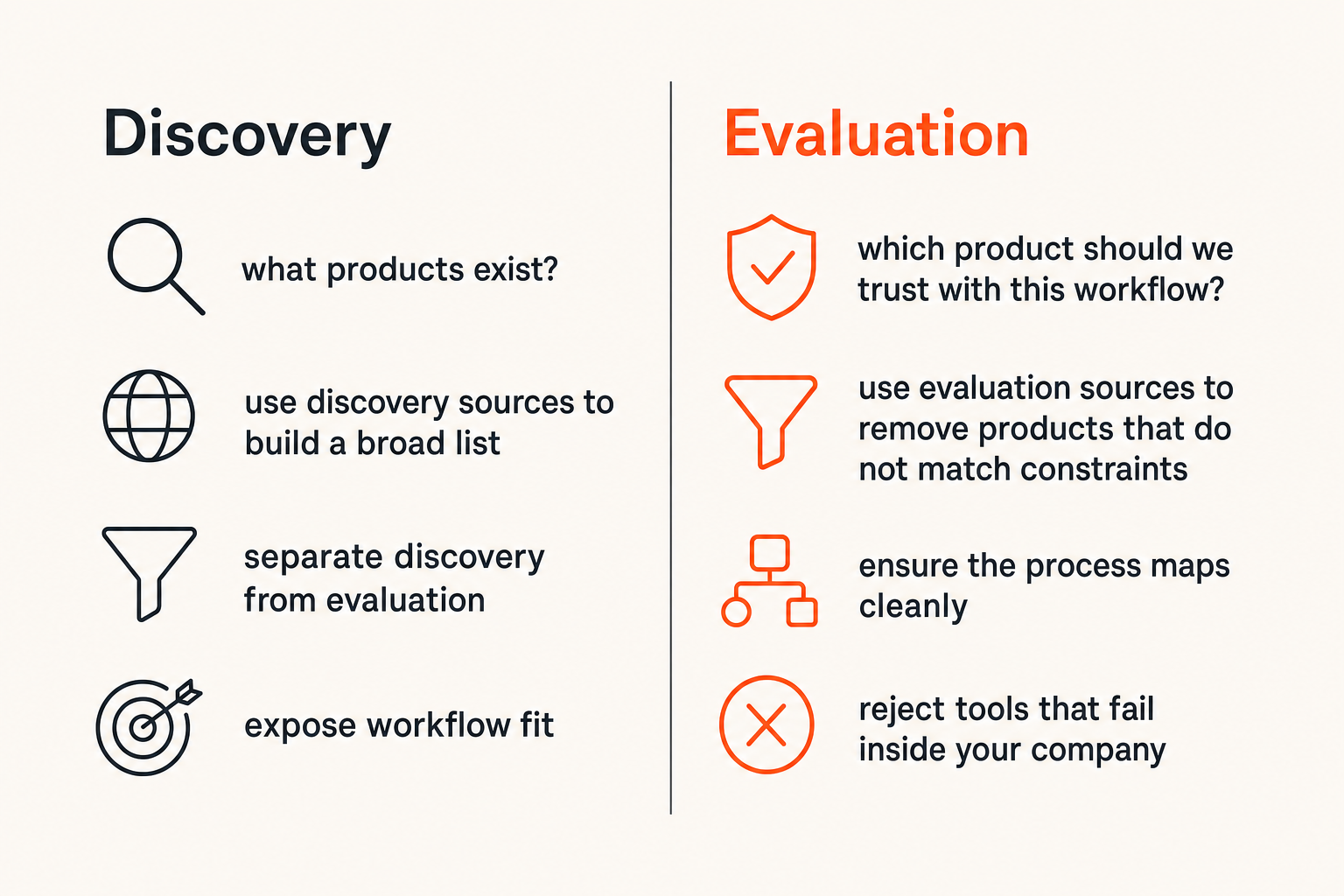
Separate discovery from evaluation
Discovery asks: what products exist?
Evaluation asks: which product should we trust with this workflow?
Those are not the same. Many teams mix them, which creates a messy shortlist full of tools that were never realistic. A productivity-focused team may add enterprise platforms because they have strong review volume, then waste time learning that the setup is too heavy.
Use discovery sources to build a broad list. Use evaluation sources to remove products that do not match constraints.
Expose workflow fit
Workflow fit is the part review sites often underrepresent. A product can have great reviews and still fail inside your company because the process does not map cleanly.
For example, a project management tool may look strong in reviews but fail if your team needs client approvals, recurring templates, granular guest permissions, and invoice handoff. A CRM may score well but break if sales, support, and finance disagree on account ownership.
The best capterra alternatives help you understand how software behaves inside real operations.
Help teams compare risk
Software buying is risk management. The risk is not only price. It includes migration work, internal adoption, vendor lock-in, reporting gaps, training overhead, and support quality.
A better buying workflow compares risk explicitly. If a cheaper product requires manual reconciliation every week, it may not be cheaper. If a popular product requires six weeks of admin configuration, it may be too slow for a small team.
Practical rule: The best software is not the one with the highest rating. It is the one your team can implement, trust, and operate without creating a second job.
The main types of capterra alternatives
There is no single category called “Capterra replacement.” There are different evidence sources. Each one has a job.
The mistake teams make is expecting every source to answer every question. That is how buyers end up frustrated. A peer community is good for candid tradeoffs but weak for structured comparison. Vendor documentation is strong for technical validation but weak for neutral sentiment. Review marketplaces are strong for discovery but uneven on workflow depth.
Review marketplaces
Review marketplaces include software directories with user reviews, filters, category pages, and comparison views. They are closest to Capterra in format.
They are useful for:
- Finding vendors in a category
- Checking review volume
- Spotting common sentiment themes
- Discovering alternatives you missed
- Comparing broad feature claims
What breaks in practice is over-weighting the rating. A 4.7 rating does not mean the product fits your use case. It means reviewers who left feedback had a generally positive experience.
Analyst-style comparison sites
Analyst-style comparison sites usually add editorial summaries, market grids, category reports, or expert-written breakdowns.
They can help buyers understand positioning: enterprise versus SMB, lightweight versus configurable, vertical-specific versus general-purpose. They can also expose maturity differences that are hard to see from user reviews alone.
The limitation is abstraction. A report may describe the market well but still not answer whether your operations manager can build the weekly report without help.
Community and peer channels
Slack communities, Reddit threads, LinkedIn posts, niche forums, and private founder groups often reveal practical issues faster than formal reviews.
These channels are especially useful for questions like:
- “What did implementation actually take?”
- “Which tool did you leave and why?”
- “How responsive is support after the sale?”
- “Which integrations are fragile?”
The downside is bias and inconsistency. One loud complaint may reflect a real platform issue or a bad fit. Use peer input as a signal, not a verdict. Related reading from our network: product strategy as a shipping system is a useful adjacent lens because buying software also requires choosing which operational bets are worth shipping.
Operator-led buying guides
Operator-led guides are less about ranking and more about decision structure. They help teams understand workflow fit, implementation sequencing, and failure modes.
This format is valuable when the category is complex or operationally specific. For example, evaluating field software requires more than comparing feature lists; it requires understanding scheduling, dispatch, mobile workflows, inventory, invoicing, and rollout risk. That is the framing behind this guide to field service management software in 2026.
A practical comparison table for software buyers
The point of comparing capterra alternatives is not to crown a winner. It is to assign each source to the right job.
| Source type | Best use | Weak spot | Buyer action |
|---|---|---|---|
| Review marketplaces | Discover vendors and scan sentiment | Ratings can hide workflow mismatch | Use filters, then read detailed reviews |
| Analyst-style sites | Understand market categories and vendor positioning | May be too high-level for daily users | Use for shortlist framing |
| Peer communities | Find candid implementation stories | Anecdotal and sometimes biased | Ask specific use-case questions |
| Vendor docs | Validate features, APIs, security, and admin model | Written to support the product | Test claims in a trial |
| Product-led trials | Prove usability and fit | Trial data may be too clean | Run realistic scenarios |
| Operator guides | Structure the decision process | May not cover every vendor | Use as a checklist and risk map |
Where each source is useful
Review marketplaces are good at the top of the funnel. They help you see the market quickly. Analyst-style sources help you understand why vendors are positioned differently. Communities reveal what buyers wish they knew earlier. Documentation and trials validate whether the product behaves as promised.
No single source should dominate the decision. The strongest buying processes combine broad discovery with narrow validation.
Where each source fails
Every source has a failure mode.
Review sites can become popularity contests. Analyst reports can favor mature vendors that are too heavy for small teams. Communities can amplify edge cases. Vendor demos can avoid weak spots. Trials can feel successful because the test scenario is too shallow.
A useful way to think about it is source triangulation. If reviews, docs, peer comments, and trial behavior all point in the same direction, confidence increases. If they conflict, investigate before signing.
How to avoid false confidence
False confidence comes from mistaking research volume for decision quality. Reading 200 reviews does not help if none describe your workflow.
Use a simple evidence standard:
- At least three credible sources per finalist
- At least one source from a similar company size
- At least one hands-on workflow test
- At least one support or onboarding interaction
- At least one check on exit risk or data export
Practical rule: If your evidence does not include your own workflow, you have not evaluated the software yet.
Build a better buying workflow than one-site research
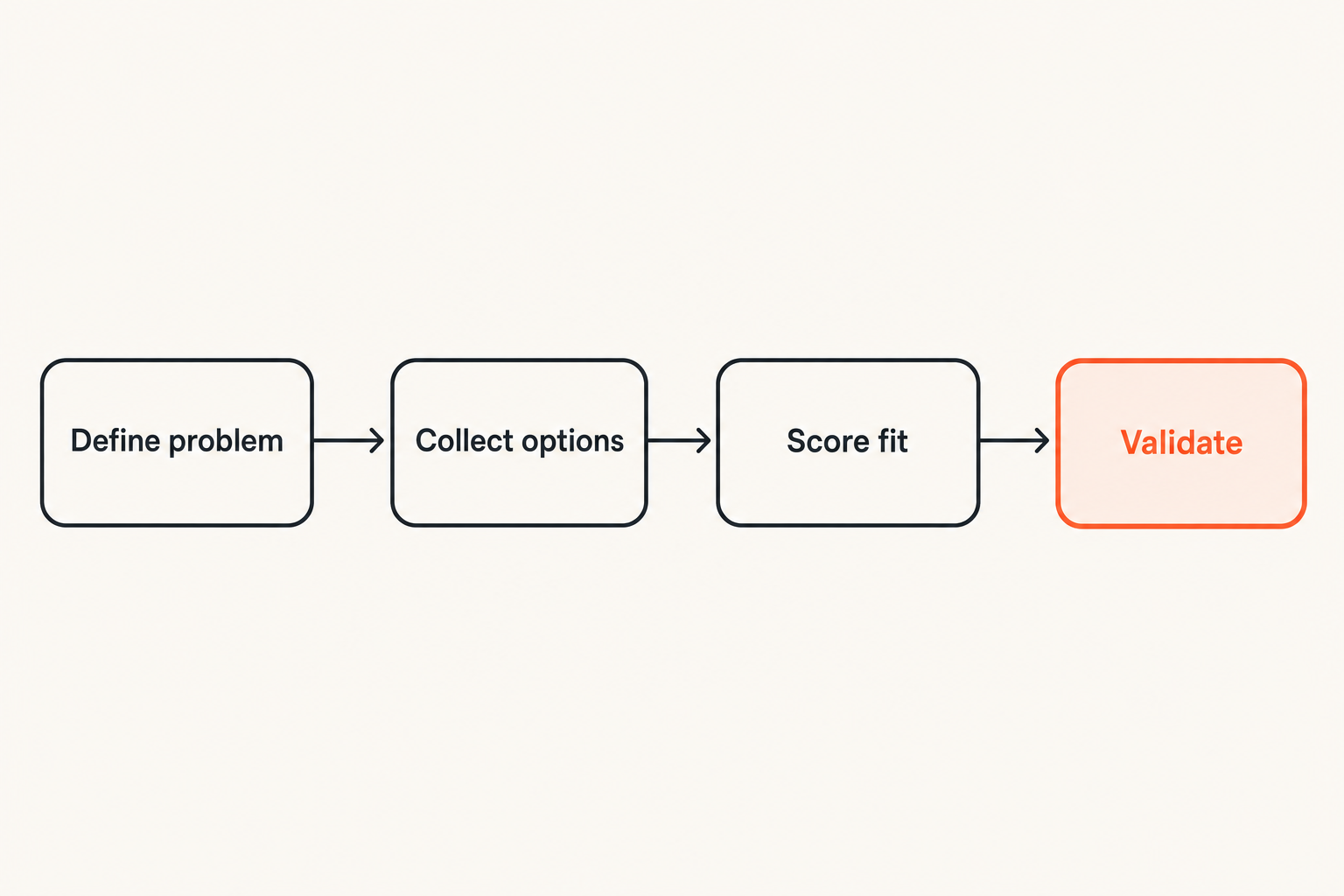
A buying workflow gives the team a repeatable path from problem to decision. It also prevents the loudest stakeholder, the prettiest demo, or the highest-ranked listing from taking over.
Here is a practical sequence that works for many SaaS buyers and small business teams.
Step 1: define the operating problem
Start with the problem, not the category.
Bad brief:
We need project management software.
Better brief:
We need one place to plan client projects, assign recurring tasks, track blocked work, share status with clients, and report delivery risk every Friday.
The second version tells you what to test. It also helps you ignore products that look impressive but do not solve the operating problem.
Step 2: collect options from multiple sources
Build a longlist from several places:
- Review marketplaces
- Search results
- Peer recommendations
- Vendor category pages
- Existing tool ecosystems
- Practical buying guides
Then remove obvious mismatches. If the product is too expensive, too enterprise-heavy, missing a core integration, or not available in your region, do not keep it for politeness.
Step 3: score against usage reality
Use a scoring model that reflects real work. Keep it simple enough that stakeholders will actually use it.
Criterion                    Weight   Vendor A   Vendor B   Vendor C
Core workflow fit             30%       4          3          5
Ease of adoption              20%       3          5          3
Integrations                  15%       5          2          4
Reporting                     15%       4          3          3
Support and onboarding        10%       3          4          4
Pricing and contract risk     10%       2          5          3
Do not let the spreadsheet pretend to be objective. Scores are conversation tools. They make assumptions visible.
Step 4: validate before procurement
Before procurement, run validation:
- Configure the most important workflow.
- Import or create realistic sample data.
- Invite the actual users, not only managers.
- Test one reporting cycle.
- Test one exception case.
- Ask support a real setup question.
- Confirm export, cancellation, and admin controls.
This is where many weak choices reveal themselves. The product may still be good, but not good for your team.
How to evaluate reviews without being misled
Reviews are useful when you read them like an operator, not a consumer.
The mistake teams make is scanning for emotional tone. Positive tone is not enough. Negative tone is not enough either. You need operational detail.
Look for operational detail
A useful review tells you what the person was trying to do. It mentions the environment.
Strong review signals include:
- Role and team size
- Implementation duration
- Specific workflows
- Integrations used
- Reporting or admin constraints
- Support experience
- What improved after adoption
- What remained painful
Weak review signals include:
- “Great product” with no context
- “Bad support” with no timeline
- “Easy to use” without describing the user
- Complaints about missing features unrelated to your workflow
Filter for company context
A 500-person company and a 12-person company may have opposite experiences with the same software. The larger company may value controls and customization. The smaller company may value speed and simplicity.
When comparing capterra alternatives, use filters aggressively. Industry, company size, role, geography, and use case all matter. If filters are weak, compensate by reading more carefully and searching outside the platform.
Treat perfect sentiment as weak evidence
Perfect sentiment is not always suspicious, but it is rarely enough. Every real product has tradeoffs.
Look for balanced reviews. The most useful reviews often say: “This is why we chose it, this is where it works, and this is where it is annoying.” That kind of review helps you predict fit.
Related reading from our network: teams evaluating software for remote collaboration may appreciate this piece on permission and recovery thinking for screen sharing, because tool selection often fails at the boundary between access, control, and user trust.
What works when comparing SaaS tools
The best buying teams keep the process boring. They reduce ambiguity, test real workflows, and force vendors to answer practical questions.
This is not about making procurement slow. It is about preventing rework after purchase.
Use a short requirements brief
A requirements brief should fit on one page. If it is 20 pages, people will not use it. If it is three bullet points, it will not guide the decision.
Include:
- Current workflow pain
- Required users and roles
- Must-have integrations
- Reporting needs
- Security or compliance constraints
- Budget range
- Rollout deadline
- Dealbreakers
Example:
Decision goal: Select a customer support tool for a 15-person SaaS company.
Must support: shared inbox, knowledge base, routing, SLA views, HubSpot sync.
Dealbreakers: no audit logs, weak export, unclear pricing above 10 seats.
Validation: run one support queue for five business days with real tickets.
Run scenario-based demos
Do not let vendors control the entire demo. Give them scenarios.
For example:
- “Show how a new customer issue moves from email to assigned owner to resolution.”
- “Show how a manager sees overdue work every Monday.”
- “Show how a user is removed and access is audited.”
- “Show what happens when an integration fails.”
Scenario-based demos turn a sales presentation into a workflow test.
Test support and onboarding early
Support quality is hard to judge from a pricing page. Test it before buying.
Ask a setup question. Ask about migration. Ask how onboarding differs by plan. Ask what happens if the implementation timeline slips.
What breaks in practice is the handoff after the sale. The account executive was responsive; the implementation queue is not. The docs look good; the edge case is undocumented. Testing support early gives you a preview.
What fails with capterra alternatives
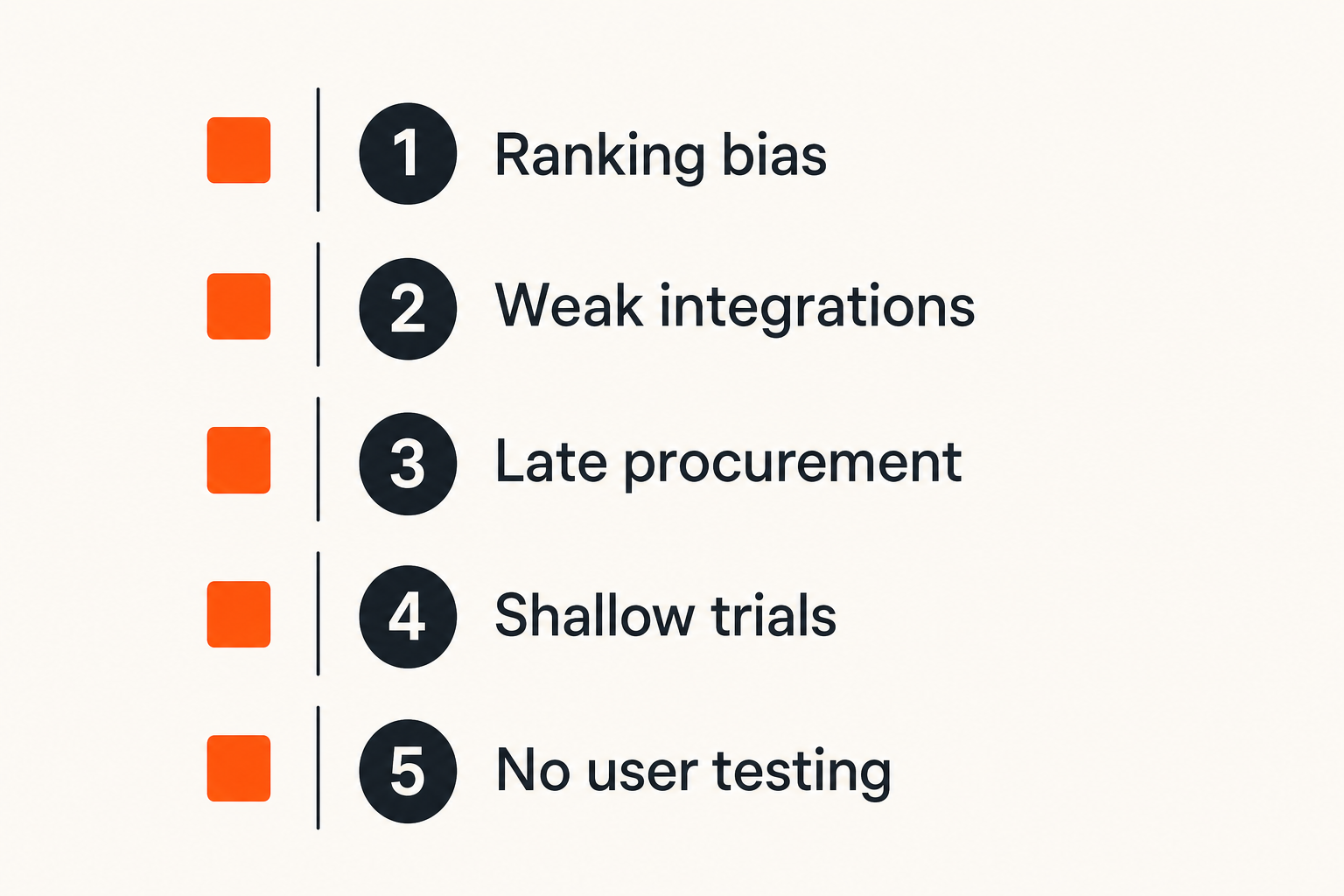
Capterra alternatives fail when teams use them the same way they used Capterra: sort, skim, shortlist, demo, buy.
That workflow feels efficient. It is often just deferred pain.
Replacing one ranking with another ranking
If your only change is moving from one ranking page to another, the core problem remains. Rankings are an input. They are not your requirements, workflow, budget model, or implementation plan.
The better move is to build a decision architecture:
- Discovery source
- Requirements brief
- Shortlist criteria
- Demo scenarios
- Trial workflow
- Risk review
- Final decision owner
That structure matters more than which directory you start with.
Ignoring integration and migration work
Many software decisions fail at the seams. The product works, but the surrounding workflow does not.
Common integration misses:
- CRM sync is one-way when the team needs two-way
- CSV export exists but omits key fields
- Slack notifications are noisy and ignored
- SSO is only available on a higher plan
- API limits affect reporting jobs
- Historical data migration requires paid services
Migration also creates hidden work: cleaning data, mapping fields, training users, updating SOPs, and rebuilding dashboards.
Letting procurement start too late
Procurement should not enter only after the team has emotionally chosen a product. That creates pressure to approve terms that should have been reviewed earlier.
Small teams may not have formal procurement, but someone still owns commercial risk. They should check:
- Contract length
- Renewal terms
- Seat minimums
- Data export rights
- Security requirements
- Support commitments
- Cancellation process
Related reading from our network: if your team builds or buys software in ecosystems where signing, distribution, and trust matter, this article on the Apple Developer Program for AI agent products is a useful adjacent view of production-grade trust workflows.
Practical rule: Bring commercial and technical constraints into the shortlist stage, not after the favorite vendor has been picked.
Category-specific checks for productivity teams
Generic evaluation advice helps, but categories have different failure modes. Productivity teams should adapt the process to the workflow they are buying for.
Project management and collaboration tools
For project management, test recurring work, dependencies, permissions, notifications, guest access, and reporting.
The most common failure is notification overload. Teams adopt a tool to create clarity, then drown in updates. During a trial, ask users which notifications they would keep after two weeks. If the answer is “almost none,” the setup is wrong or the product is not a fit.
Also test client-facing workflows if external collaboration matters. Guest permissions often look good in a demo and become awkward in production.
CRM, support, and customer operations software
For CRM and support tools, ownership rules matter. Who owns the account? Who owns the ticket? What happens when a customer is both a sales opportunity and an active support issue?
Test lifecycle transitions:
- Lead becomes customer.
- Customer submits support issue.
- Support identifies expansion opportunity.
- Account owner receives context.
- Manager reports on activity.
If the tool cannot preserve context across that path, users will create side spreadsheets.
Field, finance, and specialized workflow software
Specialized software has deeper operational constraints. Field teams need mobile access, offline behavior, dispatch visibility, inventory awareness, and invoice handoff. Finance tools need approval controls, audit trails, reconciliation, and export reliability.
This is where broad review rankings are least sufficient. You need workflow-specific validation. The same applies when evaluating niche products or branded platforms; this practical guide to Aztec software buying workflows shows how to evaluate a tool by integrations, reporting, rollout risk, and buyer readiness rather than name recognition alone.
How saasrow.com fits into the buying process
SaaS buyers do not need more hype. They need clearer ways to compare tools, pressure-test workflows, and avoid expensive mistakes.
That is where saasrow.com fits. It is not a replacement for hands-on evaluation, vendor documentation, peer feedback, or review marketplaces. It is a practical decision layer for readers who want grounded software and productivity guidance.
Use content as a decision layer
The best use of buying content is not passive reading. Use it to improve your process.
Turn useful articles into:
- Requirements questions
- Demo prompts
- Trial checklists
- Risk reviews
- Stakeholder discussion notes
- Rollout planning steps
That makes content operational. It moves from “interesting opinion” to “decision support.”
Keep the buyer accountable
Capterra alternatives can widen your view, but they cannot own the outcome. Your team owns the choice.
Before you sign, ask five final questions:
- Did we test the workflow that matters most?
- Did actual users participate?
- Did we validate integrations and reporting?
- Did we review support, contract, and export risk?
- Do we know what success looks like 30 and 90 days after rollout?
If the answer is no, keep evaluating. If the answer is yes, you have a defensible decision.
The closing point is simple: capterra alternatives are useful, but only when they serve a buying workflow. Use them to gather evidence, compare tradeoffs, and make better software decisions in 2026.
Try saasrow.com
saasrow.com publishes practical articles, guides, and insights about software and productivity for readers who want to compare tools and choose wisely. Try saasrow.com.