

August 14, 2026
Field Service Management Software in 2026: A Practical Workflow Guide for SaaS Buyers
A practical guide to field service management software for teams that need better scheduling, dispatch, mobile execution, invoicing, reporting, and rollout discipline.
A technician is late, the customer calls twice, dispatch does not know whether the part is on the truck, and accounting is waiting for job notes before sending the invoice. Everyone is working, but the business is still leaking time.
That is usually when teams start searching for field service management software. They want a cleaner calendar, a mobile app, and fewer calls between the office and the field.
Teams think the problem is scheduling. The real problem is operational state: who owns the job, what changed, what still needs to happen, and whether every downstream team can trust the record.
That changes the conversation. Field service management software is not just a dispatch screen. It becomes the workflow layer between customer requests, technicians, inventory, billing, support, and reporting. The practical question is not which tool has the longest feature list. It is which tool makes your field operation easier to run without creating a second system of spreadsheets, texts, and manual cleanup.
Table of contents
- Why field service management software is an operating system, not an app
- Map the workflow before evaluating tools
- Define ownership across office, field, and finance
- Compare field service management software by capability depth
- Integrations decide whether the system survives
- What breaks when teams implement it badly
- What works in a realistic buying process
- Implementation sequence for field service management software
- Measure whether the system is actually improving work
- Where saasrow.com fits into the software decision
- Final checklist before you choose
Why field service management software is an operating system, not an app
Dispatch is only the visible layer
The mistake teams make is evaluating field service management software like it is a shared calendar with a few technician profiles attached. That misses the hard part.
A dispatch board is visible. You can drag a job from Tuesday to Wednesday and feel like progress happened. But field work involves constraints that a generic calendar does not understand: skill matching, drive time, service windows, parts availability, emergency calls, job duration uncertainty, recurring maintenance, and customer access rules.
A useful way to think about it is this: the dispatch screen is an output of the system, not the system itself. If the underlying workflow is weak, the board becomes a prettier version of the same chaos.
Practical rule: Do not buy field service management software because the calendar looks good. Buy it because the job record becomes trustworthy from request to invoice.
Field work creates state changes
Every field job changes state several times. A request becomes a work order. A work order becomes a scheduled visit. A visit becomes an in-progress job. The job may need parts, approval, follow-up, billing, customer documentation, or warranty tracking.
If those state changes are not captured cleanly, people invent side channels. Dispatch texts technicians. Technicians send photos by message. Office staff ask for notes at the end of the day. Finance waits for confirmation. Managers export a report and then reconcile it manually.
That is not a software problem on the surface. It is a state-management problem inside the business.
Good field service software gives each role enough context to act without asking five people for the latest version of reality.
Map the workflow before evaluating tools
Start with the job lifecycle
Before you compare vendors, map the lifecycle of a typical job. Keep it boring and specific. A residential HVAC repair, a plumbing emergency, a commercial equipment inspection, and a managed maintenance visit may all need different rules.
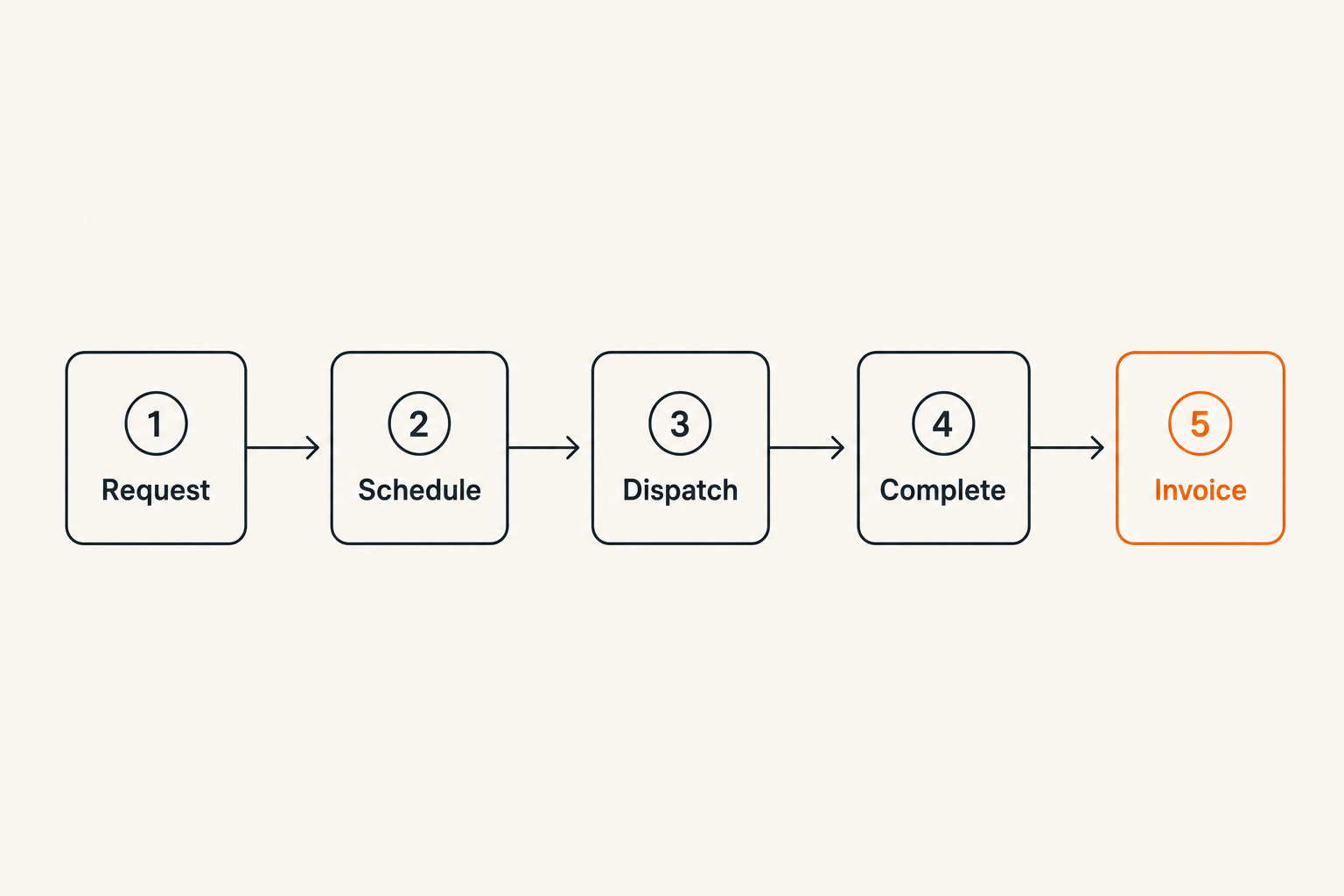
A simple lifecycle looks like this:
- Customer request enters the system.
- Office qualifies the request and creates a job.
- Scheduler assigns time, technician, and equipment.
- Technician receives route, job details, and history.
- Technician completes work, captures notes, photos, parts, and signatures.
- Office reviews exceptions.
- Invoice, payment, or follow-up is triggered.
- Customer communication and reporting are updated.
The practical question is where your current process loses information. If the answer is everywhere, start with the most expensive break: missed appointments, repeat visits, invoice delays, or technician idle time.
For teams that are also evaluating broader productivity stacks, the same workflow-first logic applies when choosing the best productivity software for small business. The tool matters, but the operating model matters more.
Identify handoffs that create delay
Field service work is full of handoffs. Sales to operations. Office to dispatch. Dispatch to technician. Technician to finance. Finance back to customer. Each handoff creates delay when the receiving person does not have the right context.
Common delay points include:
- The customer request is vague, so dispatch schedules the wrong technician.
- The technician arrives without the required part.
- Job notes are incomplete, so invoicing waits.
- A quote needs approval, but nobody owns the next step.
- A follow-up visit is needed, but it is not scheduled before the technician leaves.
What breaks in practice is not usually one dramatic failure. It is a hundred small delays that make the business feel harder to run than it should.
Related reading from our network: teams building software products face a similar workflow problem when they turn feedback into decisions, which is covered in product research surveys as a practical workflow.
Define ownership across office, field, and finance
Every job needs a current owner
A field job should never be ownerless. That does not mean one person does all the work. It means the system should make it obvious who is responsible for the next action.
Ownership changes as the job moves:
| Job stage | Likely owner | Ownership question |
|---|---|---|
| New request | Office intake | Is this real, qualified, and complete? |
| Ready to schedule | Dispatcher | Who should go, and when? |
| In progress | Technician | What was done, what changed, what is missing? |
| Exception | Service manager | Does this need approval, parts, or escalation? |
| Ready to invoice | Finance/admin | Is the record complete enough to bill? |
| Follow-up | Customer service | Has the customer been updated? |
This is where many teams discover that their current process depends on memory. Good software makes ownership visible without turning every job into a meeting.
Separate responsibility from visibility
Not everyone needs to edit every field. Dispatch may need to move jobs. Technicians may need to update status, add notes, capture photos, and collect signatures. Finance may need billing codes, tax settings, purchase orders, and payment status.
The mistake teams make is giving everyone broad access because it feels faster during setup. Later, the data gets messy. Statuses are overwritten. Job types drift. Reports stop matching reality.
Practical rule: Visibility should be broad; edit rights should be deliberate. If everyone can change the workflow, nobody owns the workflow.
Role design is not bureaucracy. It is how you keep the system usable after the first month.
Compare field service management software by capability depth
Scheduling and dispatch need business rules
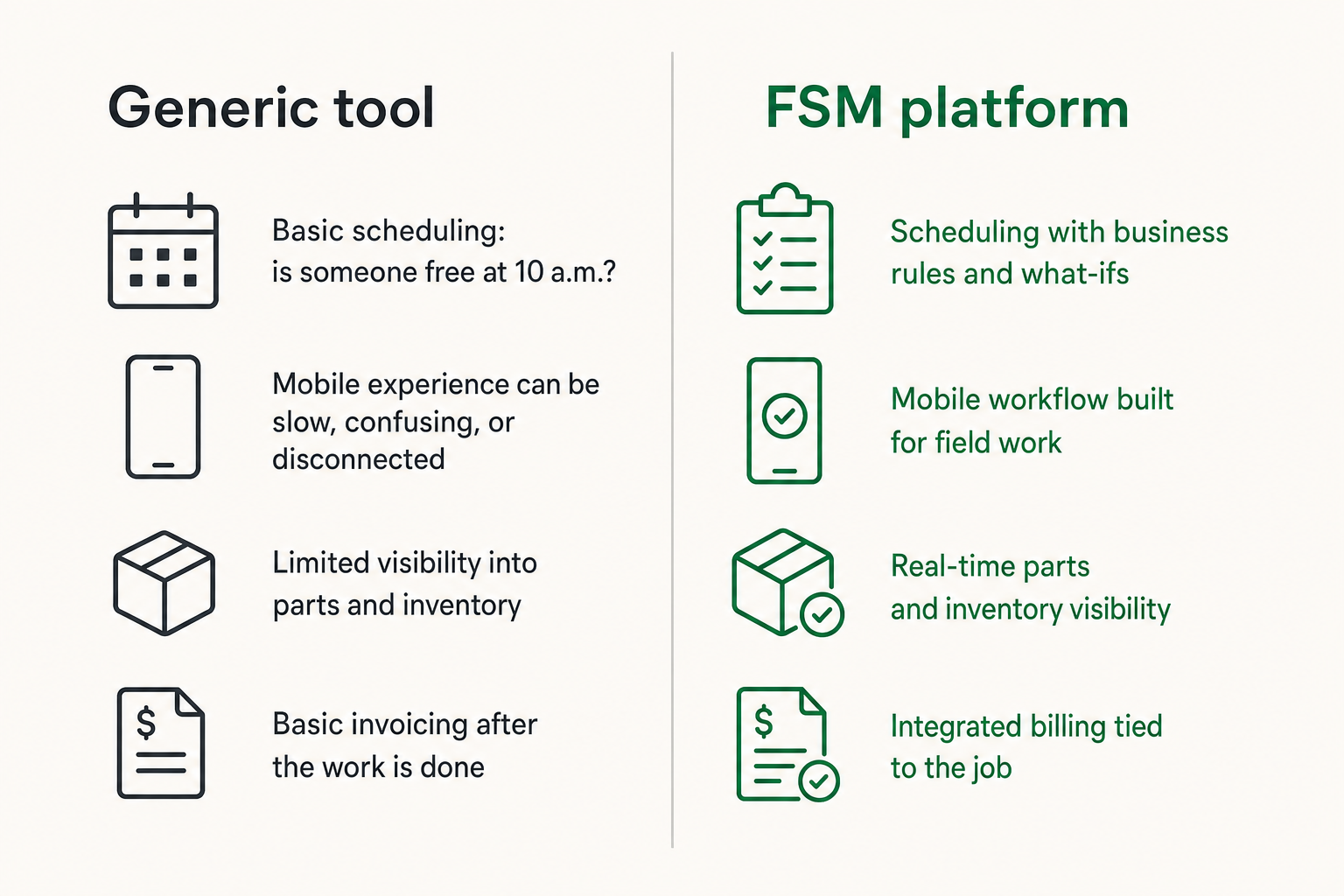
Basic scheduling asks: is someone free at 10 a.m.? Field service scheduling asks better questions:
- Is the technician qualified for this job type?
- Is the customer inside the service area?
- Does the visit require a specific part, tool, or vehicle?
- Is this an emergency, warranty call, recurring visit, or quoted job?
- Can the route absorb the extra travel time?
- What happens if the first job runs over?
This is why field service management software often overlaps with staff scheduling, but the requirements are stricter. If your main issue is coverage rules, shift availability, and labor handoff, this staff scheduling software workflow guide is a useful adjacent comparison.
For field teams, scheduling quality shows up in fewer missed windows, less technician backtracking, cleaner customer updates, and fewer end-of-day surprises.
Mobile execution is where adoption is won
The office may choose the software, but technicians decide whether the implementation survives. If the mobile experience is slow, confusing, or disconnected, field users will work around it.
Look closely at the mobile workflow:
- Can technicians see the full job history without calling the office?
- Can they work with weak connectivity?
- Are notes, photos, checklists, signatures, and parts easy to capture?
- Can they create estimates or change orders from the field?
- Does the app reduce admin work, or add it?
The technician should not need to become a data-entry clerk. The best mobile workflows capture information as a byproduct of doing the job.
Inventory, estimates, and invoicing close the loop
Many teams underbuy here. They choose software that schedules well but still leaves inventory, quoting, and invoicing outside the system.
That may be fine for simple jobs. It breaks when you need to know whether a part was used, whether the customer approved extra work, whether the invoice reflects the actual job, or whether the technician needs to return.
A practical comparison:
| Capability area | Lightweight tool | Field service platform | What to test |
|---|---|---|---|
| Scheduling | Calendar and assignments | Skills, routes, windows, emergencies | Reschedule a full day after an urgent call |
| Mobile work | Notes and status updates | Photos, forms, signatures, offline mode | Complete a job with weak signal |
| Inventory | Manual notes | Truck stock, parts used, reorder triggers | Use a part and update invoice data |
| Estimates | Separate document | Field-created quote with approval | Convert estimate to approved work |
| Invoicing | Manual handoff | Job-to-invoice workflow | Bill without chasing notes |
| Reporting | Activity counts | Operational metrics and exceptions | Find delayed jobs and causes |
Practical rule: If the tool cannot connect job completion to billing readiness, your team will keep paying a manual reconciliation tax.
Integrations decide whether the system survives
Accounting handoff is not optional
Field service management software does not need to replace your accounting system. It does need a clean handoff to it.
The minimum viable accounting integration should answer:
- When is a job ready to invoice?
- Which customer, site, purchase order, tax rule, and billing contact apply?
- Which labor, parts, fees, and discounts should transfer?
- What happens when an invoice is paid, disputed, or adjusted?
- Which system is the source of truth for customer balances?
Do not accept vague integration language. Ask what syncs, when it syncs, which direction it syncs, and what happens when the sync fails.
A simple integration contract can be written like this:
source_of_truth:
  customer_profile: accounting
  service_location: fsm
  job_status: fsm
  invoice_status: accounting

sync_rules:
  create_invoice_when: job_status = ready_to_bill
  block_invoice_when: missing_signature or missing_parts_cost
  notify_owner_when: sync_failed
This is not about technical elegance. It is about avoiding the Friday afternoon invoice audit.
CRM and customer communication need clean boundaries
Some businesses use a CRM for sales and customer history. Others expect the field service system to handle customer communication directly. Either can work if the boundary is clear.
Problems start when customer records live in three places with no ownership. Sales updates a phone number in the CRM. Dispatch uses the old number. The technician cannot reach the customer. Finance sends the invoice to the wrong contact.
The same applies to automated texts and emails. Appointment confirmations, technician-on-the-way messages, quote approvals, and post-job follow-ups are useful only if they reflect real job state.
Related reading from our network: permission boundaries matter in remote operations too, and garage door opener remote thinking for safer remote team control offers a useful analogy for access, handoffs, and recovery workflows.
What breaks when teams implement it badly
The calendar looks clean but the operation is not
A clean schedule can hide a broken workflow. Jobs may be assigned, but parts are missing. Technicians may be busy, but first-time fix rates are poor. Customers may receive confirmations, but the office is still manually chasing approvals.
This happens when teams optimize for visual order instead of operational truth.
What fails:
- Jobs are scheduled before intake is complete.
- Urgent work is inserted without route impact visibility.
- Reschedules do not notify the right people.
- Completed jobs still require manual review because required fields are optional.
- Reports count job volume but not job quality.
The result is a system that looks professional in demos and fragile in production.
Technicians work around the tool
Technician workarounds are a signal. Sometimes they indicate poor training. More often, they indicate the software does not match field reality.
Common workarounds include:
- Texting photos instead of uploading them.
- Writing notes on paper and entering them later.
- Calling dispatch for information already stored somewhere else.
- Skipping forms because they are too long.
- Using personal navigation or route tools because the built-in view is weak.
Do not dismiss these behaviors as resistance. Watch what the workaround accomplishes. It usually reveals a missing field, a slow screen, a bad permission rule, or an unrealistic checklist.
Reports become arguments instead of decisions
Bad implementations create reporting arguments. Operations says the job was complete. Finance says it was not billable. Technicians say they did the work. Customer service says the customer never got the update.
This is what happens when status values are not defined.
For example, completed may mean different things:
- Technician finished the physical work.
- Customer signed off.
- Parts and labor are recorded.
- Manager approved exceptions.
- Invoice is ready.
Those are not the same state. If the software treats them as one checkbox, your reports will lie.
Practical rule: Define operational statuses around decisions, not feelings. A status should tell the next person what they can safely do.
What works in a realistic buying process
Use scenarios instead of feature checklists
Feature checklists are useful for filtering, but weak for choosing. Most vendors can say yes to most common features. The difference is how the workflow behaves under pressure.
Use scenarios such as:
- A technician calls in sick after six jobs are already scheduled.
- A customer approves additional work while the technician is onsite.
- A required part is not available until tomorrow.
- A job needs a second technician with a different skill set.
- A completed job has missing billing information.
- A recurring maintenance visit needs to be moved without breaking the contract schedule.
Ask vendors to run these live. Do not let the demo stay in the happy path.
For adjacent software comparisons, the same scenario-based buying method is useful when comparing flexible work platforms like monday.com and ClickUp; this monday.com vs ClickUp workflow guide shows how to evaluate tools by operating fit rather than interface preference.
Score fit by role, not by demo polish
A polished demo can overrepresent the buyer experience and underrepresent the daily user experience. Build a scorecard by role.
| Role | What they need to test | Red flag |
|---|---|---|
| Dispatcher | Rescheduling, map view, urgent work, technician skills | Too many clicks to rebalance a route |
| Technician | Mobile job details, offline capture, photos, notes | Field updates feel like admin work |
| Service manager | Exceptions, approvals, performance visibility | No clear view of stuck jobs |
| Finance/admin | Billing readiness, sync rules, invoice detail | Manual cleanup after every job |
| Owner/operator | Margins, utilization, customer issues, backlog | Dashboards show volume without causes |
The winning tool is rarely perfect for everyone. But it should be credible for every role that touches the job lifecycle.
Implementation sequence for field service management software
Pilot one service line before the whole company
Rolling out field service management software to every team at once sounds efficient. In practice, it can turn a workflow change into a company-wide support burden.
A better sequence:
- Choose one service line with enough volume to expose real issues.
- Map the current workflow and define target statuses.
- Clean customer, site, technician, job type, and price data.
- Configure scheduling rules, required fields, and role permissions.
- Run a small pilot with real jobs, not fake demo data.
- Review exceptions daily for the first two weeks.
- Adjust forms, automations, and required fields.
- Expand to the next service line after the workflow stabilizes.
This sequence is slower at the start and faster overall. It gives the team a controlled environment to find what breaks.
Related reading from our network: the same staged rollout mindset applies to technical operations, including security system installation for CI/CD and software supply chains, where ownership, validation, and response matter more than buying another tool.
Build automations after the workflow is stable
Automation is useful only when the underlying workflow is understood. Automating a messy process just moves the mess faster.
Good early automations include:
- Send appointment confirmation after scheduling.
- Notify customer when technician is on the way.
- Require manager review when job cost exceeds estimate.
- Create billing task when required completion fields are present.
- Alert dispatch when a technician marks a job blocked.
- Trigger follow-up when a quote is approved but not scheduled.
What fails is automating before statuses are reliable. If technicians mark jobs complete inconsistently, an automated invoice trigger will create billing errors. If customer contact data is dirty, automated messages create support tickets.
A useful way to think about it is to automate decisions only after you trust the inputs.
Measure whether the system is actually improving work
Track lag, rework, and missing information
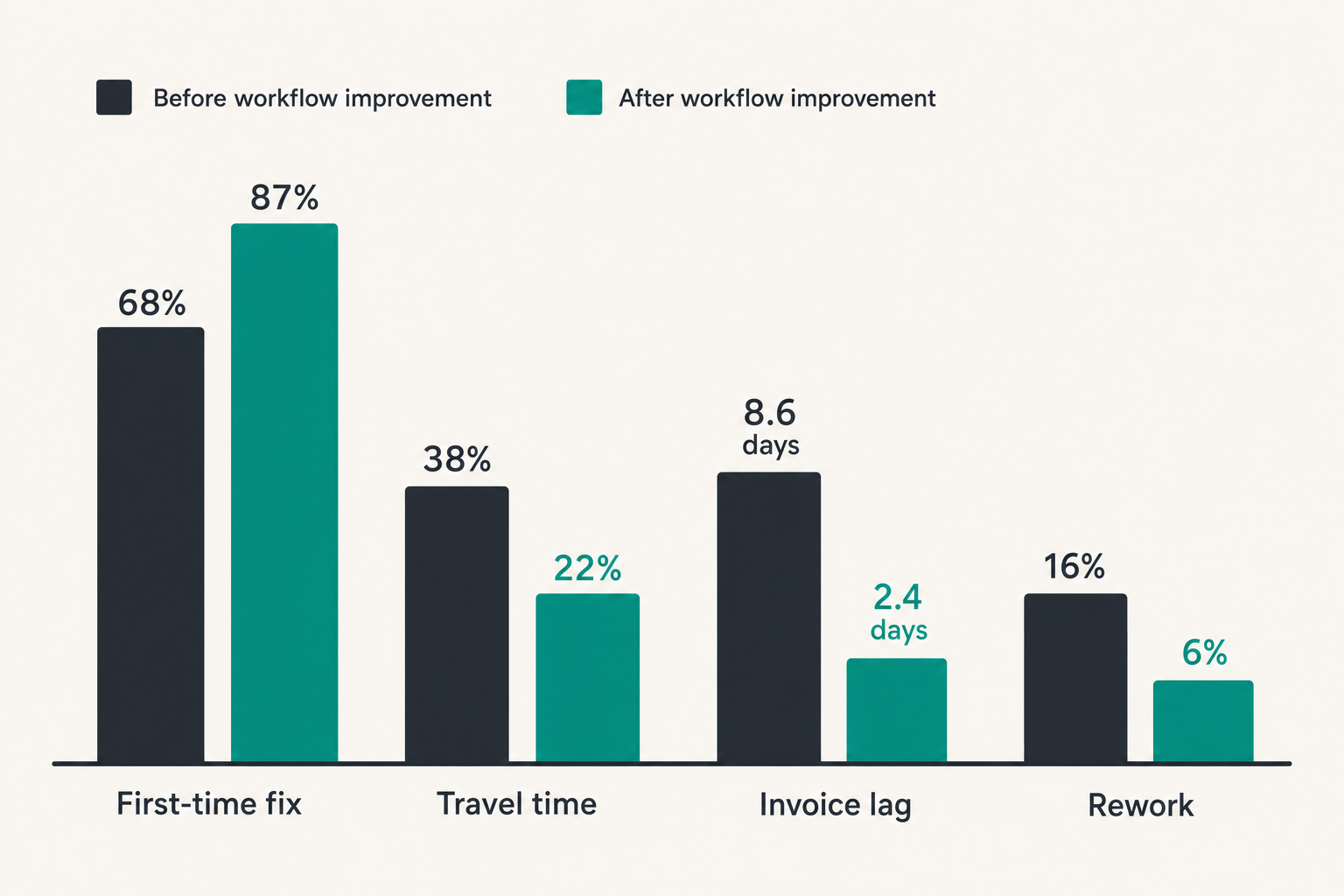
The goal is not to prove that people are busy. You already know that. The goal is to measure whether field service management software is reducing operational drag.
Useful metrics include:
- Request-to-schedule time.
- Schedule-to-arrival reliability.
- First-time fix rate.
- Jobs blocked by missing parts.
- Jobs blocked by missing customer approval.
- Completion-to-invoice lag.
- Revisit rate by job type.
- Technician idle time caused by dispatch gaps.
- Number of jobs completed with missing required information.
These metrics are not just management dashboards. They are workflow diagnostics. If completion-to-invoice lag is high, look at missing signatures, unclear parts capture, or accounting sync failures. If revisit rate is high, look at intake quality, technician matching, parts availability, or knowledge access.
Avoid vanity dashboards
Vanity dashboards make the business look measurable without making it easier to run. Total jobs completed is useful, but it does not explain margin leakage. Technician utilization is useful, but not if it rewards overpacked schedules and poor customer experience.
Better dashboards separate activity from outcomes:
| Dashboard view | Weak version | Better version |
|---|---|---|
| Job volume | Jobs completed this week | Jobs completed by type, margin, and exception rate |
| Technician performance | Number of jobs per day | First-time fix, rework, customer issues, documentation quality |
| Dispatch | Schedule utilization | On-time arrival, route efficiency, emergency impact |
| Finance | Invoices sent | Completion-to-invoice lag and blocked billing reasons |
| Customer experience | Average rating | Rating by job type, technician, and delay cause |
The practical question is whether a manager can act on the dashboard. If the answer is no, it is decoration.
Where saasrow.com fits into the software decision
Use software research as an operating review
Software buying should force useful internal questions. Why do jobs stall? Which roles are overloaded? Which handoffs depend on memory? Which reports does nobody trust? Which customer promises are hard to keep?
That is the lens saasrow.com aims to support: practical articles, guides, and insights about software and productivity for teams that want to choose tools wisely. For field service management software, the right review is not only vendor comparison. It is workflow comparison.
A useful buying document should include:
- Current workflow map.
- Target job statuses.
- Required integrations.
- Role-by-role requirements.
- Pilot scope.
- Data cleanup plan.
- Reporting requirements.
- Rollout risks.
- Decision owner.
This turns software research into an operating review instead of a procurement exercise.
Keep the buying decision grounded
Field service software vendors will continue adding AI scheduling, predictive routing, customer portals, analytics, and automation. Some of it will be useful. Some of it will be demo theater.
The grounded question is still simple: does the system reduce the amount of coordination required to deliver good work?
If it does, you should see fewer calls for basic status updates, fewer missing job notes, faster invoicing, clearer accountability, and less manual report cleanup. If it does not, the feature list does not matter.
Final checklist before you choose
The questions that matter
Before signing a contract, answer these questions plainly:
- Can the tool represent our real job lifecycle?
- Does every job state have a clear next owner?
- Can dispatch handle urgent changes without breaking the day?
- Will technicians actually use the mobile workflow in the field?
- Does the system support photos, notes, checklists, signatures, and offline work where needed?
- Are parts, estimates, approvals, and invoices connected enough for our business model?
- Which system owns customer, site, job, invoice, and payment data?
- What happens when an integration fails?
- Can we pilot one service line before full rollout?
- Which metrics will prove the system is improving work?
The mistake teams make is waiting until after implementation to ask these questions. Ask them before the demo, during the pilot, and again before rollout.
Field service management software can absolutely improve productivity. But only when it becomes the operating layer for jobs, not another screen that people update after the real work happens somewhere else.
Try saasrow.com
saasrow.com is for readers who want practical articles, guides, and insights about software and productivity. If you are comparing field service management software or tightening your broader SaaS stack, Try saasrow.com.