

August 7, 2026
Staff Scheduling Software in 2026: A Practical Workflow Guide for Better Coverage
Staff scheduling software is not just a shared calendar. This guide shows how to evaluate scheduling tools by coverage, constraints, approvals, integrations, reporting, and daily operating reality.
A bad schedule does not look like a software problem at first. It looks like a missing opener, a manager rebuilding the week in a spreadsheet at 10 p.m., an employee texting three people to swap a shift, and payroll asking why the hours do not match the plan.
That is why staff scheduling software matters. But teams usually buy it too narrowly. They compare calendars, drag-and-drop shift builders, mobile apps, and notification features. Those matter, but they are not the whole system.
Teams think the problem is creating a schedule faster. The real problem is operating a coverage workflow that survives availability changes, labor rules, demand swings, approvals, payroll, and human behavior.
That changes the conversation. The practical question is not which staff scheduling software has the cleanest calendar. It is which tool can become the source of truth for who should work, who actually worked, who approved changes, and what happens when the plan breaks.
Table of contents
- Staff scheduling software is an operating system, not a calendar
- What staff scheduling software must own in 2026
- The core scheduling workflow to design first
- Staff scheduling software comparison: lightweight tools vs operational platforms
- Integration decisions that matter more than features
- Automation rules that reduce schedule chaos
- Rollout plan for small business teams
- Failure modes that create operational debt
- Buying checklist for staff scheduling software
- Where saasrow.com fits into the software decision
Staff scheduling software is an operating system, not a calendar
Why schedules break before the week starts
Most scheduling pain starts before the first shift happens. The manager has partial availability data. Demand is guessed from memory. Employees have preferences that live in messages. Someone is trained for closing but not opening. A new hire can shadow but cannot work alone. The spreadsheet still looks clean because the spreadsheet does not know any of that.
The mistake teams make is treating staff scheduling software as a nicer layout for the same broken inputs. If availability is stale, roles are not modeled, and approvals are informal, the new tool only makes bad assumptions faster.
A useful way to think about it is this: a schedule is a decision record. It should show why a person was assigned, what constraints were considered, what changed, and who accepted the change. Without that operating context, managers keep resolving the same conflicts manually.
Practical rule: Do not buy scheduling software until you can describe the scheduling decision you expect it to improve.
For a retail shop, that decision may be matching staff levels to store traffic. For a clinic, it may be making sure the right credential is present in every slot. For an agency, it may be assigning client coverage without burning out the same senior people. Different environments need different rules, but they all need the tool to preserve context.
The workflow layer most teams miss
The visible calendar is only one layer. Under it are five workflow objects that matter more:
- Demand: how many people are needed, when, and in what roles.
- Availability: when people can work, prefer to work, or cannot work.
- Eligibility: skills, certifications, seniority, location, contract type, and labor constraints.
- Change control: swaps, callouts, approvals, and manager overrides.
- Handoff: actual hours, attendance, payroll, reporting, and exceptions.
What breaks in practice is that these objects live in different places. Availability sits in chat. Skills sit in the manager's head. Demand sits in last year's sales pattern. Time worked sits in a time clock. Payroll receives a cleaned-up version after managers spend hours reconciling exceptions.
Good staff scheduling software reduces this fragmentation. It does not eliminate judgment. It gives managers a better operating surface so judgment is spent on exceptions, not data chasing.
What staff scheduling software must own in 2026
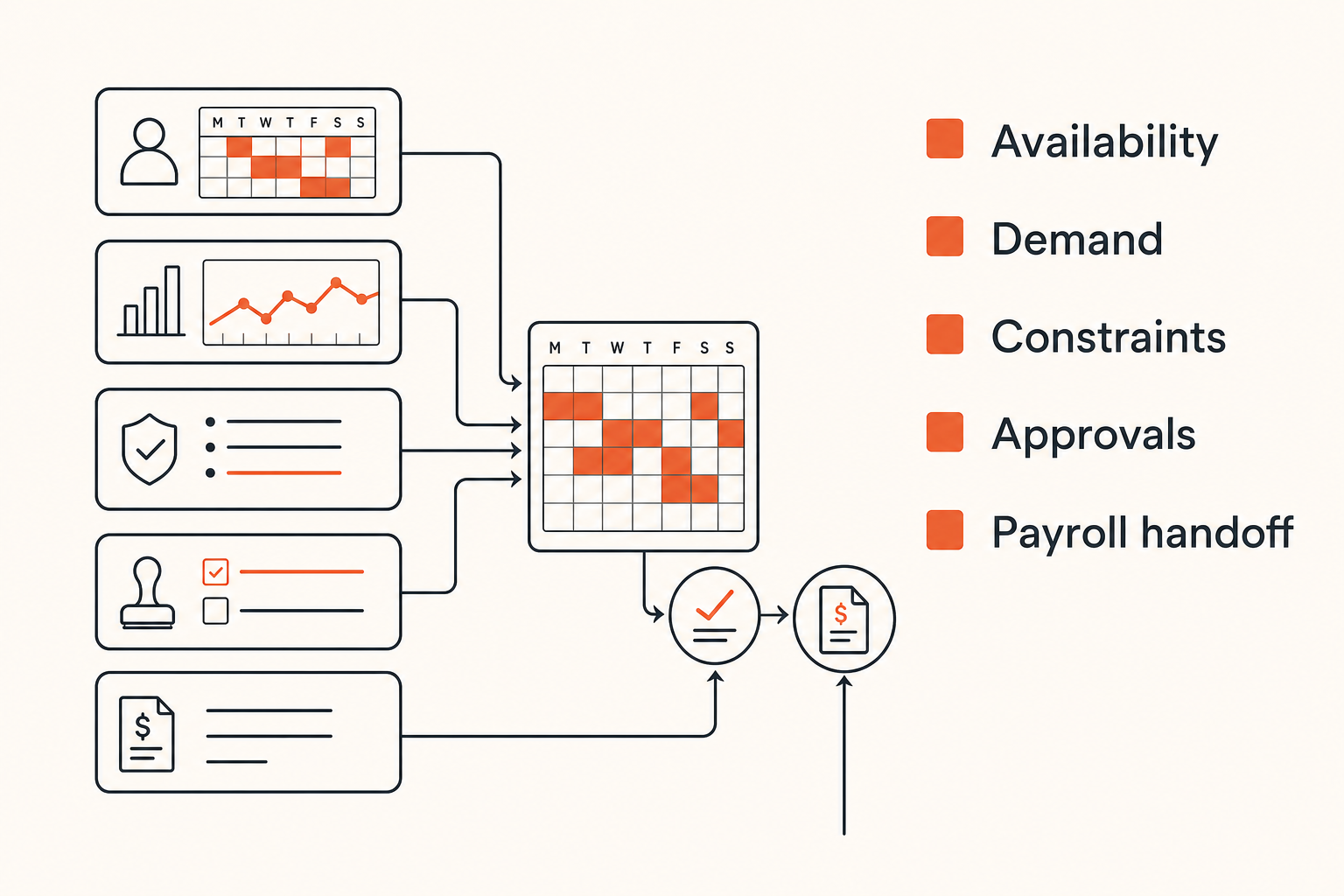
Availability, demand, and constraints
In 2026, staff scheduling software should own more than shift creation. At minimum, it should maintain a live model of availability, demand, and constraints. If the system cannot model the operating rules that define a valid schedule, it will push work back to managers.
Availability should support recurring patterns, one-off requests, blackout dates, preferred hours, maximum hours, and employee-submitted changes. Demand should support templates, forecasts, seasonality, events, appointments, sales volume, ticket volume, or whatever your business uses to decide coverage. Constraints should include role requirements, location coverage, overtime warnings, break rules, and approval thresholds.
A basic rule engine might be documented like this before you ever configure a vendor:
coverage_rules:
  weekday_open:
    required_roles: [manager, front_desk, support]
    minimum_people: 3
  friday_peak:
    required_roles: [manager, cashier, floor_lead]
    minimum_people: 5
  closing_shift:
    requires_keyholder: true
    max_new_hires_without_lead: 1
labor_rules:
  max_hours_per_week: 40
  warn_after_consecutive_days: 5
  minimum_break_minutes_after_6_hours: 30
The exact format does not matter. The discipline matters. If your team cannot express these rules, the software cannot enforce them.
Notifications, swaps, and approvals
Scheduling does not end when the schedule is published. In many teams, the real workload starts afterward: someone requests time off, someone gets sick, demand changes, a manager approves a swap, and payroll later needs to know which version is real.
Good staff scheduling software treats change as a first-class workflow. Employees should know whether a shift is proposed, published, accepted, swapped, declined, or approved. Managers should see what changed since the schedule was published. The system should log approvals without forcing people to dig through messages.
Practical rule: If a shift can change outside the scheduling system without leaving an audit trail, the scheduling system is not the source of truth.
This does not mean every small business needs enterprise workforce management. It means even simple tools should make the current state obvious. A clean mobile notification is useful. A reliable state model behind that notification is more important.
The core scheduling workflow to design first
Start with demand before assigning people
Many teams start scheduling by asking who is available. That is backwards. Availability matters, but demand defines the problem. First decide what the business must cover. Then decide who can cover it.
For example, a cafe may need two people from 7 to 9 a.m., four during the lunch rush, one manager at all times, and a trained closer after 6 p.m. A support team may need live chat coverage across time zones, escalation ownership, and backup capacity for spikes. A field service team may need geography, travel time, certifications, and emergency coverage.
The practical question is: what would make this schedule invalid? If the answer is unclear, the tool will not save you. You will keep finding problems after publication.
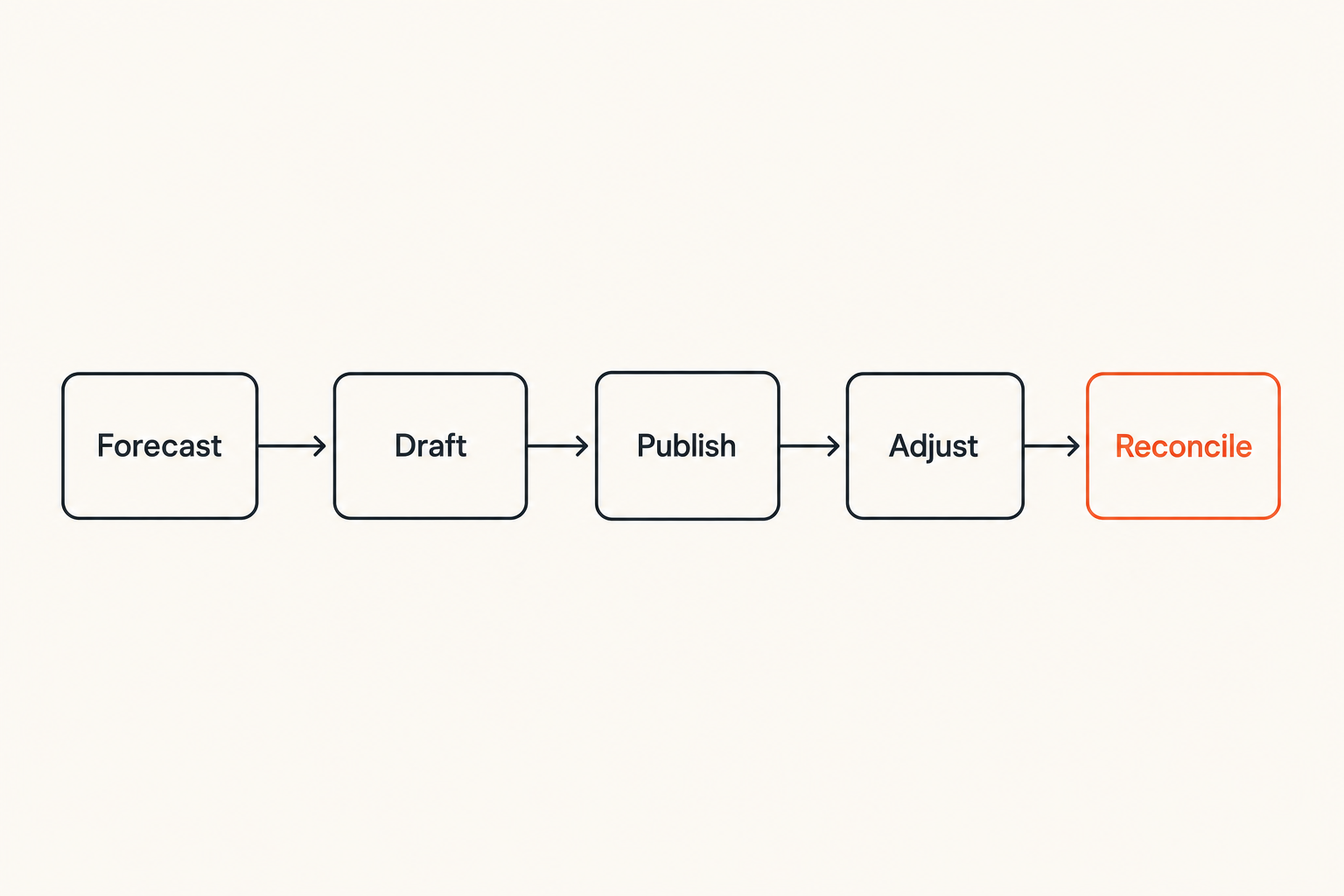
A demand-first workflow usually looks like this:
- Define coverage blocks by day, role, location, and expected volume.
- Add hard constraints such as certifications, keys, labor rules, and required breaks.
- Add employee availability and preferences.
- Generate or manually build assignments.
- Review warnings before publishing.
- Collect confirmations and resolve exceptions.
- Reconcile actual hours against scheduled hours.
That workflow is not glamorous. It is the difference between a calendar and an operating process.
Build the weekly operating loop
Staff scheduling software should support a weekly loop that managers can repeat without heroic effort. The loop should be boring by design.
A practical weekly sequence:
- Monday: review demand drivers for the next schedule period.
- Tuesday: lock availability changes and time-off requests.
- Wednesday: draft the schedule and review warnings.
- Thursday: publish and collect employee confirmations.
- Friday through Sunday: manage swaps, callouts, and demand changes.
- End of week: reconcile actual hours, exceptions, and payroll handoff.
Related reading from our network: teams building repeatable launch and operating systems face similar ownership questions in product operations workflows, even though the domain is different.
The point is not that every team must follow this exact cadence. The point is that the software should fit a cadence. If a vendor demo only shows how fast someone can drag shifts into a calendar, ask how the tool supports the full loop.
Practical rule: A schedule is not complete when it is published. It is complete when actual work, exceptions, and approvals reconcile cleanly.
Staff scheduling software comparison: lightweight tools vs operational platforms
When a simple rota tool is enough
Not every team needs complex workforce management. A lightweight rota or employee scheduling app can be enough when the operation is small, stable, and low-risk.
A simple tool may work if:
- The team has fewer locations or departments.
- Most employees can perform most shifts.
- Labor rules are simple.
- Payroll reconciliation is low-volume.
- Managers already have a reliable approval process.
- Schedule changes are rare and easy to track.
In that case, paying for a heavy platform may create more complexity than value. The best tool is the one your managers will actually use correctly.
When you need rules, integrations, and reporting
You need a more operational platform when the schedule has business logic. That usually shows up as multiple roles, variable demand, compliance rules, overtime risk, certifications, locations, union rules, shift bidding, or payroll complexity.
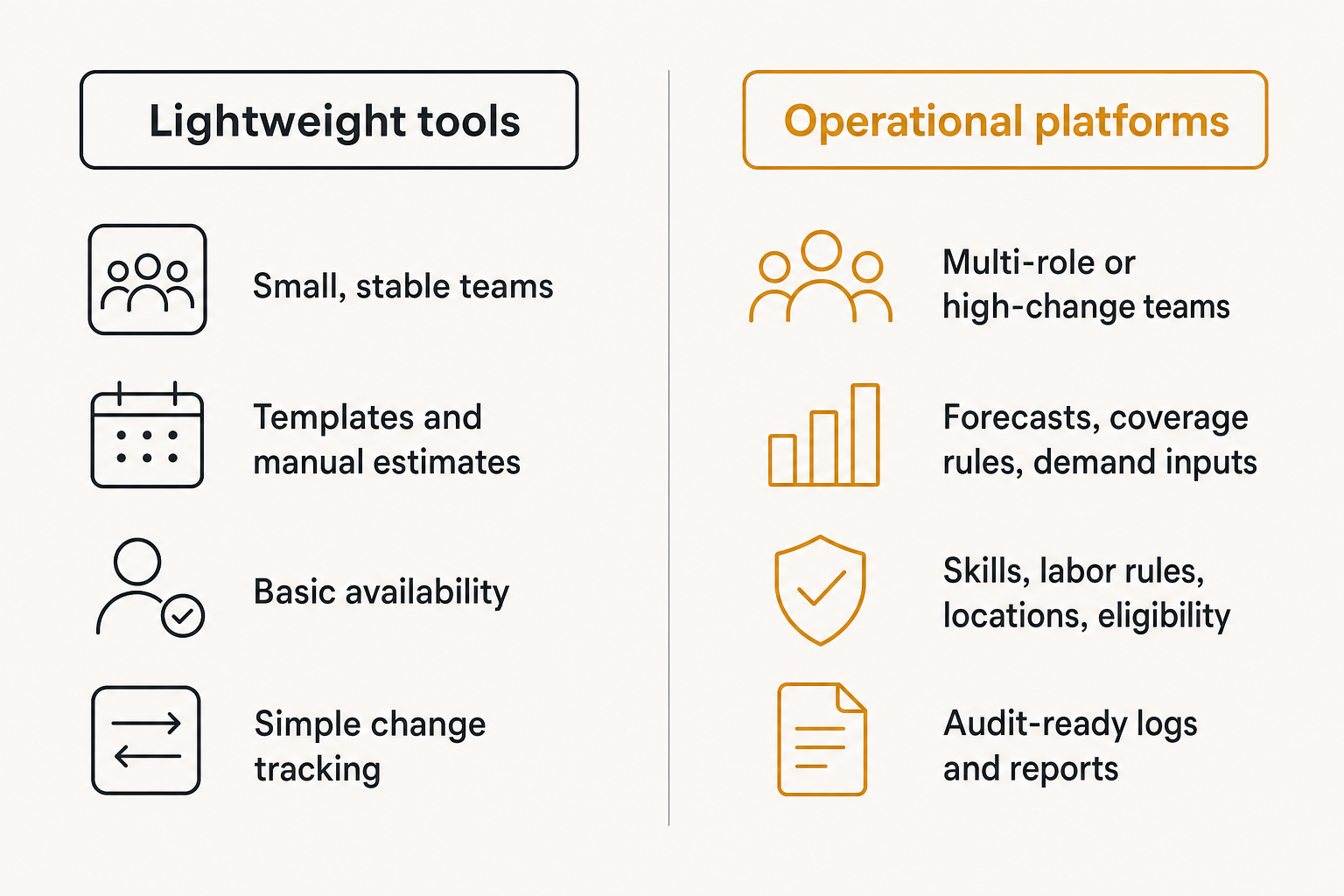
| Decision area | Lightweight scheduling tool | Operational scheduling platform |
|---|---|---|
| Best fit | Small, stable teams | Multi-role or high-change teams |
| Demand planning | Templates and manual estimates | Forecasts, coverage rules, demand inputs |
| Constraints | Basic availability | Skills, labor rules, locations, eligibility |
| Change management | Simple swaps and messages | Approval workflows, audit trails, exception states |
| Integrations | Calendar, chat, basic payroll export | Payroll, time clock, POS, HRIS, reporting APIs |
| Manager workload | Low setup, more manual judgment | More setup, less repetitive reconciliation |
| Risk if misused | Missed updates | Bad rules can scale bad decisions |
The mistake teams make is assuming more features automatically means better scheduling. More features help only when they map to real operating rules. Otherwise, the platform becomes a high-priced spreadsheet with more settings.
Integration decisions that matter more than features
Time tracking, payroll, and attendance
The schedule is the plan. Time tracking is the record of what happened. Payroll is the financial consequence. If those systems do not connect cleanly, managers become the integration layer.
For many small businesses, this is where staff scheduling software either pays for itself or becomes another tab to maintain. Scheduled hours should flow into attendance expectations. Actual clock-ins should be compared against scheduled shifts. Approved changes should update payroll-relevant records. Exceptions should be visible before payroll closes.
If your scheduling project touches time clocks, approvals, or timesheets, compare the operating model against a broader time tracking software workflow rather than evaluating timers and schedules separately.
Ask vendors how they handle:
- Employees clocking in early, late, or from the wrong location.
- Schedule changes after a shift has started.
- Missed punches and manager corrections.
- Overtime warnings before they become payroll issues.
- Export formats and payroll approval workflows.
- Historical edits and audit trails.
A tool that cannot explain the handoff from scheduled hours to approved hours is not ready to own the workflow.
POS, project management, and communication tools
Different teams schedule against different demand signals. Retail and restaurants may care about POS volume. Clinics may care about appointments. Agencies may care about client workload. Support teams may care about ticket queues and coverage windows.
This is why integrations matter. A schedule built in isolation can look clean and still miss the workload. Even a manual import can be better than no demand signal, as long as the process is owned.
For office and SaaS teams, scheduling often overlaps with work management. If your schedule depends on project capacity, ownership, or cross-functional work queues, it can help to compare the scheduling decision with broader project workflow tradeoffs like those covered in monday.com vs ClickUp workflow planning.
Communication is another integration trap. Employees may prefer SMS, email, push notifications, Slack, Teams, or WhatsApp. The tool does not need to support every channel, but it must make the official state clear. Chat can notify. It should not become the system of record.
Related reading from our network: distributed teams face similar context-loss problems when they design remote work architecture, especially when decisions move across chat, meetings, and tools.
Automation rules that reduce schedule chaos
What works: constrained automation
Scheduling automation works best when it narrows a decision, not when it pretends humans are interchangeable. A good automation rule might warn that Friday coverage is short one trained closer. It might suggest employees who are available, under hours, and eligible for the role. It might block a shift assignment that violates a hard rule.
What works in practice:
- Auto-detecting uncovered demand blocks.
- Suggesting eligible employees rather than assigning blindly.
- Highlighting overtime risk before publishing.
- Routing swap requests to the right approver.
- Sending reminders for unconfirmed shifts.
- Flagging actual hours that differ from scheduled hours.
A practical automation policy could be written like this:
If shift is unfilled and starts within 48 hours:
  notify eligible employees in the same location
  exclude employees over weekly hour threshold
  require manager approval before assignment
  log acceptance time and approver
That is useful automation because it respects constraints and ownership.
What fails: black box scheduling
Black box scheduling fails because managers and employees do not trust unexplained decisions. If the system assigns one person every weekend, ignores informal preferences, or creates technically valid but operationally bad coverage, people route around it.
The vendor demo may show a schedule generated in seconds. In production, the question is whether the generated schedule is explainable, editable, and auditable. If managers spend an hour fixing it, the automation did not save time. It moved the work.
Practical rule: Automate warnings and candidate selection before automating final assignments.
The safest path is staged automation. Start with rule checks. Then add suggestions. Then automate low-risk assignments. Keep human approval where the cost of a bad decision is high.
Rollout plan for small business teams
Map roles, rules, and exceptions
Before rollout, document the current scheduling reality. Not the ideal process. The real one. Who builds the schedule? Who approves time off? Which employees have special constraints? Which shifts are hardest to fill? Which exceptions happen every week?
Create a simple map:
- Roles: manager, shift lead, cashier, support agent, technician, nurse, closer, opener.
- Locations or teams: store, department, region, queue, client pod.
- Coverage rules: minimum headcount, required skills, peak periods, backup needs.
- Employee constraints: availability, preferences, max hours, certifications.
- Approval paths: time off, swaps, overtime, emergency changes.
- Downstream systems: time clock, payroll, HR, reporting, communication.
This mapping step feels slow. It prevents bad configuration. A scheduling tool configured around vague roles and outdated availability will disappoint everyone quickly.
Run a controlled pilot before replacing spreadsheets
Do not replace the spreadsheet for the whole company on day one. Run a pilot with one team, one location, or one schedule cycle. Keep the scope small enough that managers can inspect every issue.
A controlled rollout sequence:
- Configure roles, locations, employees, and permissions.
- Import or enter availability and time-off data.
- Build the next schedule in both the old process and the new tool.
- Compare coverage, overtime warnings, conflicts, and manager edits.
- Publish through the new tool to a pilot group.
- Track confirmations, swaps, and missed notifications.
- Reconcile actual hours and payroll handoff.
- Adjust rules before expanding.
The goal is not a perfect first schedule. The goal is to expose bad assumptions while the blast radius is small.
Failure modes that create operational debt
Coverage gaps hidden by pretty calendars
A beautiful calendar can still hide bad coverage. This is the most common failure mode. The schedule has names in every box, but the wrong people are assigned, the wrong skills are present, or demand is underestimated.
Examples:
- A closing shift has two employees but no keyholder.
- A support schedule covers business hours but not escalation ownership.
- A clinic schedule fills rooms but misses credential requirements.
- A restaurant has enough people on paper but not enough trained stations.
- A service team ignores travel time and creates impossible routes.
This is software gore in operational form: the interface may look acceptable, but the workflow underneath is broken. If you want a broader lens for spotting those problems before rollout, use the patterns in software gore workflow buying when you evaluate scheduling demos.
What breaks in practice is not the calendar. It is the assumption that a filled slot equals a covered operation.
Manager workarounds and employee distrust
When staff scheduling software does not match reality, managers create workarounds. They keep private spreadsheets. They approve swaps in chat. They tell employees to ignore certain notifications. They edit payroll manually. Each workaround may be rational. Together, they destroy trust in the system.
Employees notice. If availability requests are ignored, they stop submitting them. If swaps are approved inconsistently, they stop trusting the process. If schedules change without clear notification, they screenshot everything. Once that happens, the tool becomes another source of conflict.
Related reading from our network: even though it is a different category, security teams face comparable ownership and signal-quality issues when selecting cyber security software for CI/CD workflows; bad tooling creates parallel processes instead of control.
The fix is not more reminders. The fix is clearer ownership, better rules, and a system that reflects the actual operating agreement.
Buying checklist for staff scheduling software
Questions to ask vendors
Use vendor demos to test workflow fit, not feature vocabulary. Ask for scenarios that match your business. If the vendor cannot model your common exceptions in the demo, assume your managers will handle them manually later.
Strong questions include:
- How does the tool define a valid schedule?
- Can we model roles, skills, locations, certifications, and seniority?
- How are availability changes requested, approved, and logged?
- What happens when an employee swaps a shift after publication?
- Can managers see uncovered demand before publishing?
- How are overtime warnings calculated?
- How does the tool compare scheduled hours to actual hours?
- What payroll systems are supported, and what data is exported?
- Can employees confirm shifts from mobile devices?
- What audit trail exists for edits, approvals, and exceptions?
- How are permissions handled for managers across locations?
- Can reports separate planned labor from actual labor?
Ask the vendor to run through a messy week, not a perfect one. A perfect demo schedule tells you very little.
Red flags during demos
Watch for signs that the tool is optimized for screenshots instead of operations.
Red flags include:
- The demo starts with drag-and-drop scheduling but never shows demand planning.
- Availability is treated as a note, not a constraint.
- Swap approvals happen outside the system.
- The vendor cannot explain payroll handoff clearly.
- Overtime warnings are shown only after publishing.
- Permissions are too broad for multi-location teams.
- Reporting focuses on exports but not operational decisions.
- Employees can change critical data without approval paths.
- The system has no clear audit trail for schedule edits.
Also test support reality. Ask what happens during implementation, how data imports work, whether managers get training, and how configuration changes are handled. Small teams rarely fail because they lacked one niche feature. They fail because setup, ownership, and change management were underestimated.
Where saasrow.com fits into the software decision
Use scheduling as a workflow comparison exercise
At saasrow.com, the goal is to help readers compare software by how it changes daily work, not by who has the longest feature list. Staff scheduling software is a good example because the visible product is deceptively simple. Everyone understands a calendar. Fewer teams pressure-test the workflow behind it.
When comparing tools, build a short evaluation scorecard:
| Evaluation area | What to verify | Why it matters |
|---|---|---|
| Demand model | Can the tool represent required coverage? | Prevents filled calendars with weak staffing |
| Constraint model | Can it enforce roles, skills, hours, and rules? | Reduces manager memory work |
| Change workflow | Are swaps, callouts, and approvals tracked? | Keeps the schedule trustworthy after publishing |
| Integration fit | Does it connect to payroll, time, POS, or work tools? | Prevents duplicate entry and reconciliation pain |
| Employee experience | Are requests and confirmations clear? | Reduces confusion and side-channel coordination |
| Reporting | Can managers compare planned vs actual labor? | Helps improve future schedules |
This kind of comparison is not as quick as scanning pricing pages. It is more useful. The right question is not whether a scheduling tool has automation. The right question is whether its automation respects your operating rules.
Closing the loop on staff scheduling software
The best staff scheduling software creates a clean loop: demand becomes a draft schedule, constraints shape assignments, employees receive clear requests, changes are approved in the system, actual hours reconcile against the plan, and managers learn from the gap.
That loop is the architecture. The UI matters because people need to use it. But the workflow matters more because the schedule touches payroll, service quality, employee trust, and manager time.
If you are buying in 2026, evaluate staff scheduling software with a messy week in mind. Include late changes, partial availability, overtime risk, a missing manager, a payroll deadline, and an employee who needs a shift swap. The tool that handles that week clearly is more valuable than the tool that makes the clean demo schedule fastest.
Try saasrow.com
saasrow.com publishes practical articles, guides, and insights for readers who want to choose software wisely and improve productivity workflows. Try saasrow.com when you want grounded software comparisons, including staff scheduling software decisions.