

July 6, 2026
turbotax software in 2026: A Practical Workflow Guide for Small Business Teams
TurboTax is not just a filing app. This guide helps small business teams decide where turbotax software fits in their finance workflow, what breaks, and how to implement it cleanly.
Tax season gets messy when teams treat turbotax software like a once-a-year form-filling tool. The return may be the visible output, but the actual work starts months earlier: clean books, payroll data, contractor records, receipts, entity details, owner distributions, depreciation schedules, and support decisions.
Teams think the problem is choosing tax software. The real problem is designing a tax workflow that can survive real business operations.
That changes the conversation. The practical question is not whether TurboTax has enough screens or whether a competitor has a cleaner interface. The question is whether your team can turn operational data into a defensible filing process without burning weeks on cleanup, rework, and support tickets.
In 2026, small businesses and SaaS operators are more software-dependent than ever. Payments, payroll, subscriptions, marketplaces, bank feeds, contractor tools, and accounting platforms all create tax-relevant data. If those systems are disconnected, tax software becomes the place where every earlier mistake finally surfaces.
Table of contents
- Why turbotax software is a workflow decision in 2026
- Where turbotax software fits in your finance stack
- Decide what you are buying before you compare plans
- Implementation workflow for turbotax software
- Data quality rules that prevent tax season chaos
- Integrations exports and records management
- What breaks when teams implement turbotax software badly
- What works for small teams and SaaS operators
- How to evaluate turbotax software against alternatives
- How saasrow.com fits the software decision
Why turbotax software is a workflow decision in 2026
The mistake teams make
The mistake teams make is waiting until filing season to decide how tax work will run. They open the app, answer prompts, import a few documents, and assume the software will resolve gaps that actually belong in bookkeeping, payroll, legal, or operations.
TurboTax can guide a user through a filing path. It cannot retroactively decide whether your categories were consistent, whether a contractor should have received a form, whether owner reimbursements were documented, or whether a business expense has enough support.
For a solo employee with a W-2 and a few simple forms, the app may feel like the whole workflow. For a small business, the software is the final assembly layer. The harder work is upstream.
Practical rule: Do not evaluate tax software by the filing screen alone. Evaluate the handoffs that feed it.
What changed for small business tax work
Small businesses now run on fragmented software stacks. Revenue may arrive through Stripe, PayPal, marketplaces, wire transfers, app stores, invoicing tools, and subscriptions. Expenses may live across corporate cards, reimbursements, bank transactions, SaaS renewals, contractor platforms, and cloud vendors.
That is normal. It is also why filing season feels worse than it should.
When each system defines customers, payouts, refunds, fees, and categories differently, the tax workflow becomes an integration problem. The tax app receives summary numbers, but the owner still needs confidence in where those numbers came from.
Related reading from our network: teams dealing with remote operations face similar tooling and ownership issues in cloud based productivity and collaboration tools, especially when work happens across disconnected apps.
The practical question
The practical question is simple: can turbotax software fit into your existing finance stack without becoming a manual cleanup project?
That depends on four things:
- Entity complexity: sole proprietor, single-member LLC, partnership, S corporation, C corporation, or multiple entities.
- Data quality: clean books, reconciled accounts, categorized expenses, and documented adjustments.
- Support needs: self-service, assisted filing, CPA review, or a separate tax firm.
- Record retention: whether you can prove the numbers later, not just submit them now.
If you cannot answer those questions, plan comparison pages will not help much.
Where turbotax software fits in your finance stack
The tax app is not the system of record
A useful way to think about it is this: turbotax software is an output tool, not your finance source of truth.
Your accounting platform, bank records, payroll system, cap table, billing system, and document storage are closer to the source. Tax software consumes the results. It may import data, ask questions, and generate forms, but it should not be the only place where business logic exists.
If you make tax decisions only inside the filing app, you create a hidden operating model. Nobody knows why a category was changed, why an amount was excluded, or why a deduction was handled one way instead of another.
That is risky even for small teams. It is worse when the person filing this year is not the person filing next year.
The handoff map
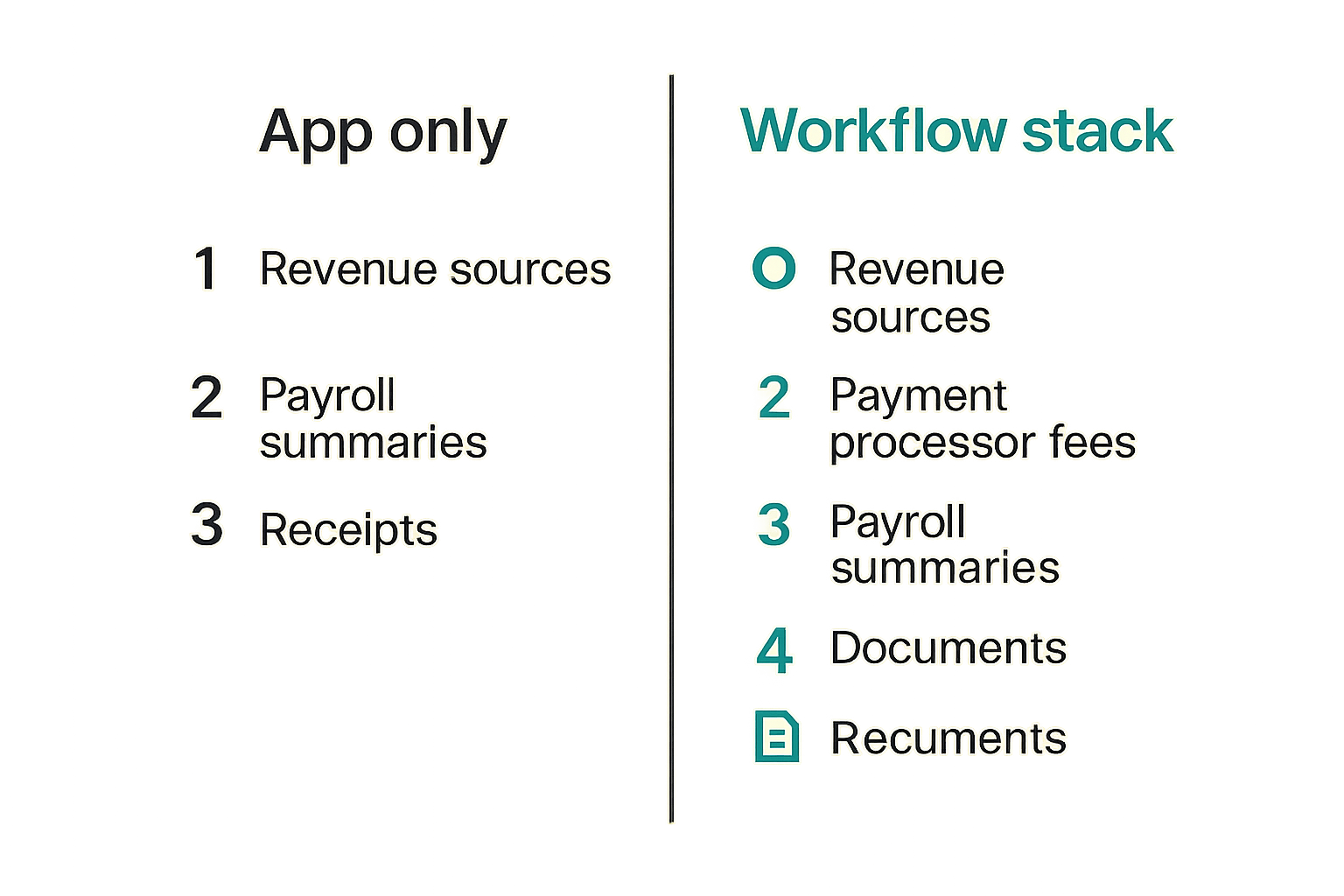
Before choosing a TurboTax plan or alternative, map the handoffs. This does not need to be fancy. A spreadsheet is enough.
Track:
- Revenue sources and where they reconcile.
- Payment processor fees and refunds.
- Payroll summaries and employer taxes.
- Contractor payments and forms.
- Owner contributions, draws, or distributions.
- Loan interest and debt records.
- Fixed assets and depreciation support.
- Receipts and documentation for major deductions.
The goal is not perfect finance operations. The goal is to avoid discovering critical missing data after you are already inside the filing flow.
Comparison table
| Layer | Primary job | Common tool types | What should happen before TurboTax |
|---|---|---|---|
| Banking | Cash movement | Bank portals, card tools | Reconcile accounts and identify transfers |
| Revenue | Sales and fees | Billing, checkout, marketplaces | Separate gross revenue, refunds, chargebacks, and fees |
| Accounting | Books and categories | QuickBooks, Xero, spreadsheets | Close the year and review categories |
| Payroll | Wages and taxes | Payroll platforms | Confirm W-2, 1099, employer tax, and benefit data |
| Documents | Evidence | Drive, Dropbox, DMS | Store receipts, statements, contracts, and tax forms |
| Filing | Return preparation | TurboTax, assisted filing, CPA tools | Import or enter validated numbers |
This table is intentionally boring. Boring is good. Tax season does not need creativity. It needs traceability.
Decide what you are buying before you compare plans
Individual filing versus business operations
The first decision is not brand. It is scope.
Some users need personal filing software with a small amount of business income. Others need a business return, payroll coordination, depreciation schedules, multi-state support, or owner-level tax planning. Those are different workflows.
If your business is simple, turbotax software may be a practical fit. If your business has investors, multiple owners, complex equity, foreign income, state nexus questions, or unusual revenue recognition, the filing software may only be part of the process.
This is similar to broader SaaS buying: the tool matters, but the work design matters more. For a broader software selection lens, the workflow-first approach in Pivotal Software in 2026 applies well to finance tooling too.
Assisted support versus internal ownership
Support is not a luxury add-on. It is an operating decision.
If nobody on the team understands the tax path, you need either assisted support inside the software or an outside professional. If someone does understand the path, you still need review checkpoints. Self-service does not mean no controls.
The mistake teams make is buying the cheapest plan and treating support as an emergency option. That usually fails when the issue is not a software question but a facts-and-documents question.
Examples:
- The software can ask whether an expense qualifies; it cannot know whether the business purpose was documented.
- The software can import numbers; it cannot know whether your books were reconciled correctly.
- The software can produce a form; it cannot know whether the entity structure was set up cleanly.
Practical rule: If the question requires business judgment, do not expect the filing app to solve it automatically.
The real cost model
The sticker price is rarely the full cost. The real cost includes cleanup time, owner distraction, missed deductions, amendment risk, support delays, and future confusion.
For small teams, the largest cost is often context switching. The founder, office manager, or finance lead stops normal work to chase old invoices, categorize ambiguous transactions, and re-check imports. That is not free just because there is no line item for it.
A practical cost model includes:
- Software subscription or filing fee.
- State filing costs.
- Assisted support or expert review.
- Bookkeeping cleanup hours.
- Internal review time.
- Document storage and retrieval work.
- Risk of amendment or follow-up.
The cheapest option can be expensive if it pushes too much unresolved work onto your team.
Implementation workflow for turbotax software
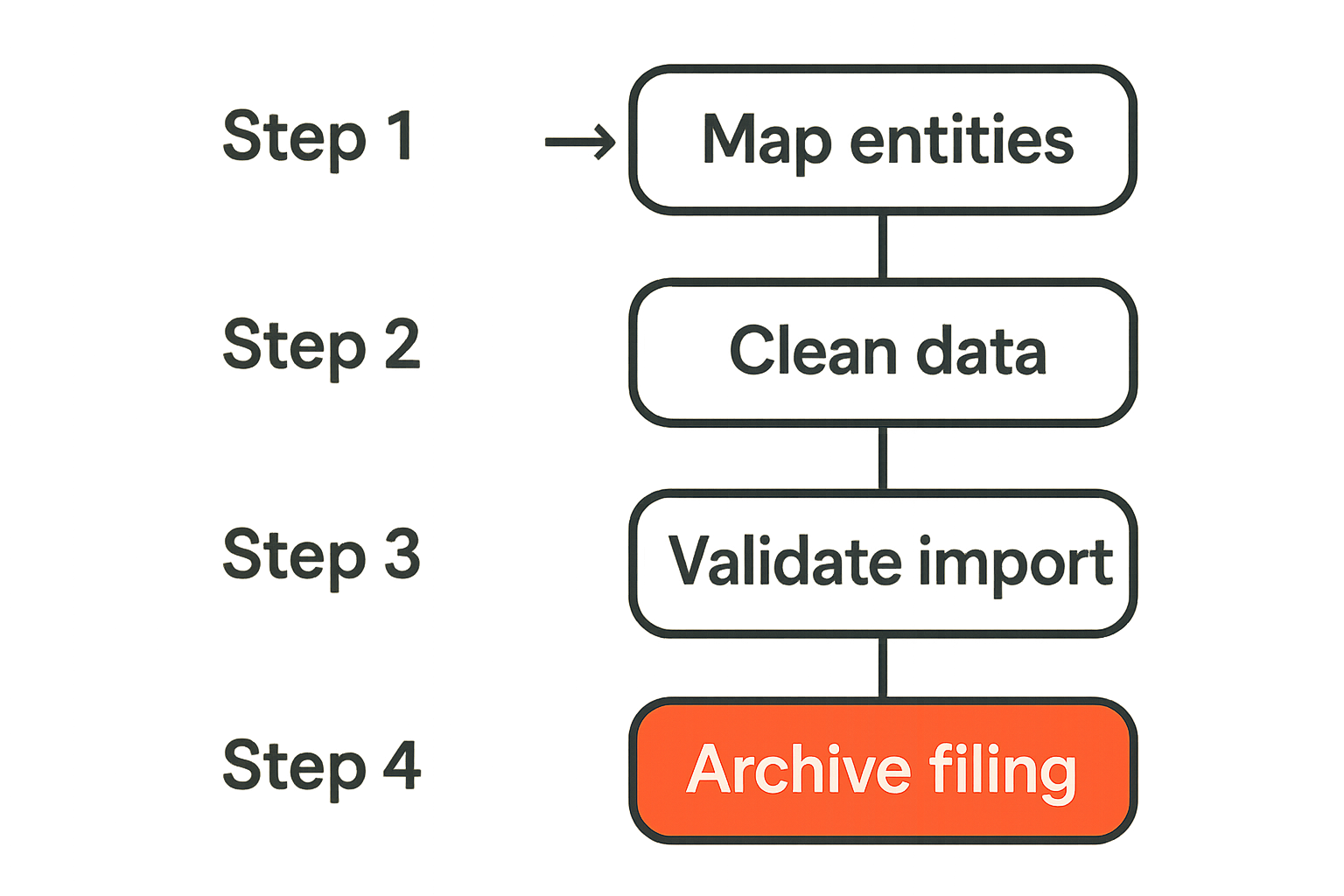
Step 1 map entities and forms
Start with the legal and tax structure, not the software screen.
Create a short filing map:
- List every entity and owner.
- Identify the expected return type for each entity or individual.
- List states where filing may be required.
- List expected forms from banks, payroll providers, clients, marketplaces, and investment accounts.
- Identify who owns each data source.
This matters because many tax problems are actually entity problems. A freelancer, a single-member LLC, a partnership, and an S corporation can all have different filing requirements. The software path only makes sense after the structure is clear.
Step 2 clean source data
Do not import messy data and hope to fix it later. Clean it upstream.
Before using turbotax software, close the year in your accounting system:
- Reconcile all bank and card accounts.
- Review uncategorized transactions.
- Separate transfers from income.
- Confirm loan principal versus interest.
- Review owner reimbursements and distributions.
- Confirm payroll liabilities and payments.
- Review contractor payments and forms.
What breaks in practice is not the import button. It is the assumption that imported data equals correct data.
Step 3 import validate and lock
After cleanup, import or enter data into the filing workflow. Then validate totals against source reports.
Use a simple control sheet:
- Accounting net income equals filing input, or differences are explained.
- Payroll wages match payroll year-end reports.
- Contractor totals match issued forms.
- Interest and dividend forms match imported amounts.
- Depreciation schedules agree with asset records.
- State allocations are reviewed.
Once validated, lock the source reports used for filing. Do not keep changing the books while preparing the return unless you have a controlled adjustment process.
Step 4 review file and archive
The review should not be a quick scroll through the final return. It should answer three questions:
- Are the numbers consistent with the closed books?
- Are major deductions supported by documents?
- Could someone else understand the filing position next year?
Archive the return, workpapers, source reports, forms, receipts for major items, and notes on judgment calls. Store them in a predictable folder structure.
Example:
- 2026 tax return final
- 2026 filing workpapers
- 2026 accounting reports used
- 2026 payroll and contractor forms
- 2026 bank and card statements
- 2026 deduction support
- 2026 review notes
This is not bureaucracy. It is future time saved.
Data quality rules that prevent tax season chaos
Chart of account hygiene
Your chart of accounts is one of the quiet drivers of tax-season quality. If categories are too broad, the filing process becomes guesswork. If categories are too granular, the team wastes time maintaining distinctions that do not matter.
A good chart of accounts should be stable, understandable, and aligned with reporting needs. It should separate major tax-sensitive areas such as meals, travel, software subscriptions, contractor labor, payroll, legal fees, professional services, interest, taxes, and equipment.
The practical question is whether a reviewer can understand the business from the reports. If every SaaS subscription is buried in miscellaneous expense, you have created a cleanup problem.
Practical rule: Design accounting categories for review, not just data entry.
Payroll contractor and equity data
Payroll and contractor records create some of the most annoying filing issues because they often live outside the accounting system.
For employees, confirm wages, taxes, benefits, reimbursements, and employer tax payments. For contractors, confirm vendor details, payment totals, and form requirements. For companies with equity, confirm option exercises, founder stock activity, and any tax documents that may affect owners or employees.
Even if turbotax software can handle the final entry, the operational truth lives in payroll, HR, legal, and payment systems. Someone needs to reconcile those systems before filing.
Related reading from our network: focused software teams launching specialty products run into similar handoff problems across product, finance, and go-to-market workflows, which is why specialty products are often an operating-system challenge rather than just a positioning challenge.
Receipts deductions and evidence
Many teams over-focus on whether an expense is deductible and under-focus on whether they can support it.
Documentation should answer:
- What was purchased?
- When was it purchased?
- Who approved it?
- What was the business purpose?
- Which account or card paid for it?
- Where is the receipt or contract?
For small expenses, automated receipt capture and card feeds may be enough. For larger deductions, keep contracts, invoices, board approvals, or written notes. The return is only one artifact. The evidence trail is the control system.
Integrations exports and records management
Accounting system integration
TurboTax and adjacent tax tools often support imports from accounting software or financial institutions, but integration should not be treated as validation.
An import can move data accurately and still move bad data. It can also flatten context. For example, a payment processor payout may combine sales, refunds, fees, disputes, and timing differences. If those components are not separated upstream, the tax workflow may inherit a misleading number.
Before importing, generate reports from the accounting system and review them manually. For many small teams, the best workflow is not full automation. It is controlled automation: import where reliable, review where judgment matters.
Export strategy
Tax software should not become a dead-end repository. You need exports that support future review.
At minimum, save:
- Final filed return.
- Filing confirmation.
- Source reports used for inputs.
- PDF copies of tax forms.
- Workpapers or worksheets.
- Notes on differences between books and tax treatment.
- Support conversation transcripts if expert help was used.
If the software changes, the account is inaccessible, or ownership changes, your archived exports should still explain the filing.
Audit packet design
An audit packet does not mean you expect an audit. It means your records are organized enough that a future question does not turn into a company-wide search.
A lightweight audit packet can include:
- Return PDF and filing confirmation.
- General ledger export.
- Profit and loss statement.
- Balance sheet.
- Payroll annual reports.
- Contractor form summary.
- Bank and card statements.
- Major deduction support.
- Notes on unusual transactions.
This is especially useful when team members change. The person who remembers why something happened may not be available two years later.
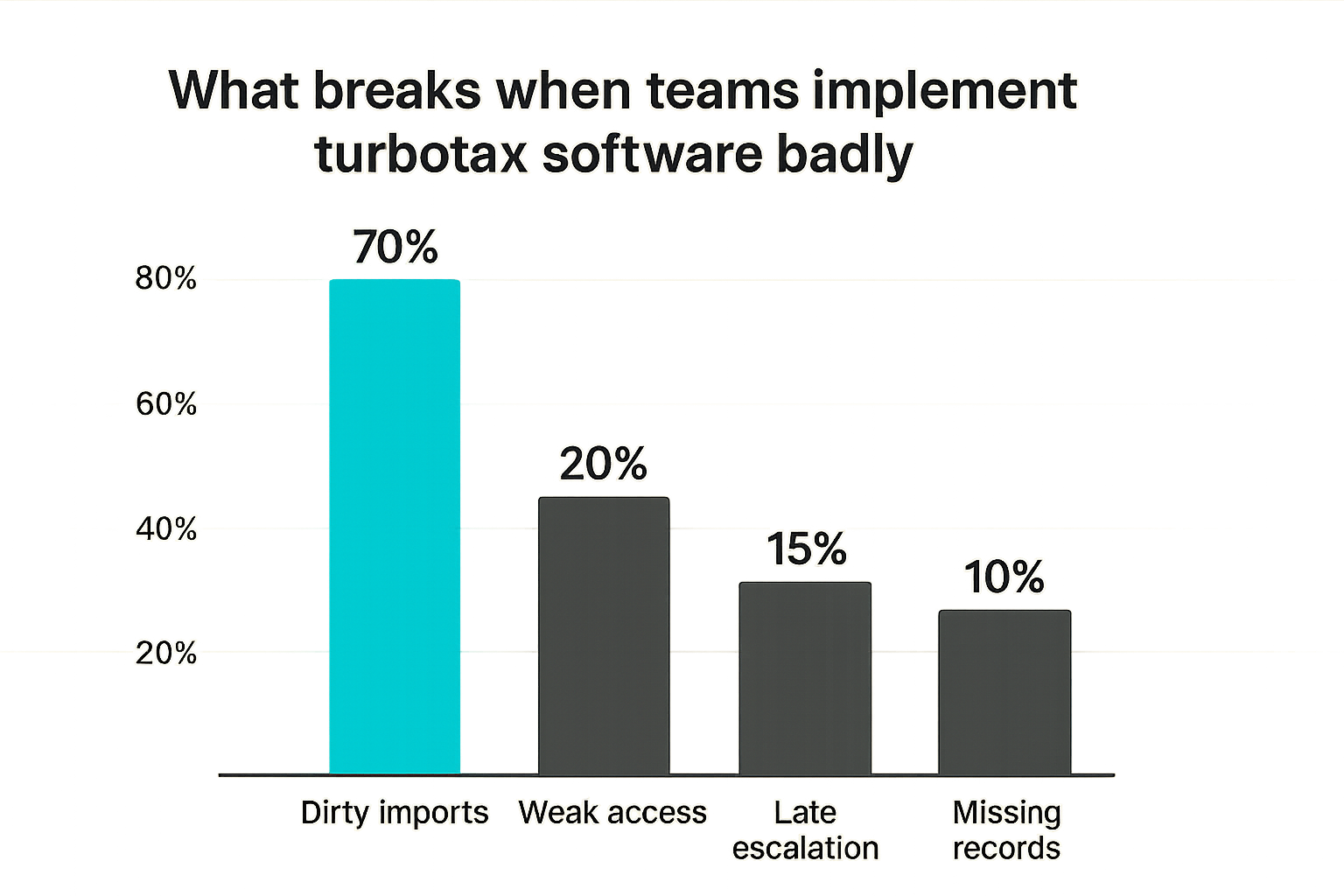
What breaks when teams implement turbotax software badly
Dirty imports
Dirty imports are the most common failure mode. The team imports numbers from an accounting system that has unreconciled accounts, duplicated transactions, uncategorized expenses, or misclassified transfers.
The software then does what it is supposed to do: it accepts inputs and routes the user through filing questions. The result looks orderly, but the underlying numbers are weak.
Common symptoms include:
- Revenue that does not match payment processor totals.
- Bank balances that do not reconcile.
- Payroll expenses that differ from payroll reports.
- Transfers counted as income.
- Personal expenses mixed with business expenses.
- Duplicate transactions from bank feed issues.
What fails is the belief that a clean interface means clean books.
Shared logins and weak access control
Small teams often share credentials during filing season. It feels efficient until it creates a security and accountability problem.
Tax accounts contain sensitive personal and business data: Social Security numbers, addresses, income, bank details, payroll information, and identity documents. Shared logins make it harder to know who changed what. Weak passwords and reused credentials increase risk.
Use named users where available, strong authentication, secure document sharing, and limited access. Do not send full tax packets through casual chat channels.
Related reading from our network: privacy-sensitive teams face the same workflow issue in communication tools, where end-to-end encrypted messaging only works if identity, devices, and backups are designed properly.
Last minute expert escalation
Expert support works best when the facts are ready. It works poorly when a team escalates a messy situation days before the deadline.
A tax professional or assisted filing expert can interpret rules, review positions, and catch issues. They cannot instantly reconstruct a year of missing records. The more complex the business, the earlier escalation should happen.
Last-minute escalation often fails because:
- Source data is incomplete.
- Entity facts are unclear.
- Prior-year returns are missing.
- Payroll or contractor forms are not ready.
- State filing questions require research.
- Owners disagree about distributions or reimbursements.
The earlier you separate software questions from business questions, the better support works.
What works for small teams and SaaS operators
Assign one finance owner
Tax work needs a directly responsible owner. Not necessarily a full-time finance hire, but one person who owns the filing workflow, data checklist, support path, and archive.
Without an owner, tax work becomes a distributed guessing game. The founder thinks the bookkeeper has it. The bookkeeper thinks payroll has it. Payroll thinks the owner reviewed it. Nobody owns the final bridge into the filing software.
For SaaS teams, this mirrors hiring and role design. Before adding people or tools, define the work. The same operating principle shows up in Software Engineer Jobs in 2026, where role clarity matters more than vague headcount plans.
Use a close checklist before filing
A close checklist gives the team a repeatable pre-filing gate. Keep it short enough to use, but specific enough to prevent obvious mistakes.
A practical checklist:
- Bank accounts reconciled.
- Credit cards reconciled.
- Revenue tied to billing and payment systems.
- Payroll reports saved.
- Contractor totals reviewed.
- Owner transactions reviewed.
- Fixed assets updated.
- Loans and interest confirmed.
- Major deductions documented.
- Prior-year return available.
- State filing assumptions reviewed.
- Final reports exported and locked.
This checklist should run before the team enters the main filing workflow. Otherwise, the software becomes the checklist, which is too late.
Build a support path
Decide in advance when to ask for help.
Escalate when:
- Entity structure is unclear.
- Multiple owners or investors are involved.
- The company operates in multiple states.
- Payroll corrections are needed.
- Books are materially unreconciled.
- Prior-year filings may be wrong.
- There are major asset purchases or disposals.
- The business had unusual income, debt, or equity events.
A support path can be as simple as: internal owner does cleanup, bookkeeper closes books, tax expert reviews complex questions, software handles filing mechanics. The point is to avoid pretending one tool owns every decision.
How to evaluate turbotax software against alternatives
When turbotax software is enough
TurboTax software can be enough when the filing situation is straightforward, records are clean, and the team understands the business facts.
Good fit signals include:
- Simple personal return or simple business activity.
- Clean accounting records.
- Limited state complexity.
- Few owners or no ownership complexity.
- Standard income and expense categories.
- Minimal asset, debt, or equity complexity.
- Confidence in self-service or assisted software support.
In this case, the value is convenience, guided workflow, document import, and faster filing. The team still needs records discipline, but it may not need a full-service tax firm.
When to use a tax professional or firm
Use a tax professional when complexity moves beyond guided prompts.
Common triggers:
- Multiple entities.
- Partnerships or S corporations with owner-level issues.
- Multi-state nexus questions.
- International revenue or contractors.
- Significant equity compensation.
- Complex depreciation.
- Prior-year corrections.
- Acquisition, sale, shutdown, or restructuring.
- Large uncertain deductions.
This is not anti-software. It is good architecture. Sometimes the right stack is accounting software plus tax professional plus filing platform. Sometimes it is self-service software plus expert review. The point is to match the workflow to risk.
Buyer scorecard
Use a simple scorecard before choosing a filing path.
| Question | Low complexity | Medium complexity | High complexity |
|---|---|---|---|
| Entity structure | Individual or sole proprietor | LLC or simple S corp | Multiple entities or owners |
| Books | Reconciled and reviewed | Some cleanup needed | Material uncertainty |
| Payroll | None or simple | Employees and contractors | Corrections or multi-state payroll |
| Revenue | Few sources | Several platforms | Complex timing, refunds, or marketplaces |
| Support need | Self-service | Assisted review | Dedicated tax professional |
| Records | Organized | Partially organized | Missing or inconsistent |
If most answers land in low complexity, turbotax software may be a practical fit. If several answers land in high complexity, treat the software as one component, not the whole answer.
How saasrow.com fits the software decision
Practical software comparison over hype
At saasrow.com, the goal is not to crown one tool as universally best. That is rarely how software works in production. The better question is fit: who owns the workflow, what systems connect, what data quality is required, what breaks when the team is busy, and what support model exists when edge cases appear.
TurboTax is a useful example because the visible product is simple to understand, but the surrounding workflow is not. The same pattern applies across productivity software, finance tools, engineering platforms, HR systems, and collaboration apps.
A tool should reduce operational drag. It should not hide unresolved ownership problems behind a polished interface.
Adjacent workflow lessons
Tax software decisions also teach a broader SaaS lesson: do not buy tools to compensate for undefined work.
If the team has no owner, no checklist, no source-of-truth map, and no review process, any software will feel worse than expected. If the workflow is clear, even a basic tool can perform well.
For teams designing technical roles and software responsibilities, the same principle appears in Software Engineer Jobs in 2026: define the work before optimizing the tool or title.
Before you commit to turbotax software or an alternative, write down the workflow. Map sources, owners, support needs, exports, and failure modes. Then choose the tool that fits the operating model you can actually maintain.
Try saasrow.com
You are writing for readers who want practical articles, guides, and insights about software and productivity. For more grounded software workflow guides, Try saasrow.com.