

July 10, 2026
Asana Project Management Software in 2026: A Practical Workflow Guide for SaaS and Small Business Teams
Asana project management software works best when teams treat it as workflow infrastructure, not a shared task list. This guide explains setup, rollout, integrations, metrics, and buying tradeoffs.
Asana project management software is easy to start and surprisingly easy to misconfigure.
A founder creates a workspace. A marketing lead adds a campaign board. Product opens a roadmap project. Support starts tracking escalations. Within a month, the team has tasks everywhere, comments in three places, due dates nobody trusts, and status meetings that still exist because the tool did not replace the workflow.
Teams think the problem is task management. The real problem is operating design.
That changes the conversation. The practical question is not whether Asana has boards, timelines, automations, goals, forms, AI summaries, or integrations. It does. The practical question is whether your team can turn Asana project management software into a reliable system for intake, ownership, prioritization, delivery, and follow-up in 2026.
Table of contents
- Asana project management software is a workflow layer, not a task list
- Where Asana fits in the SaaS operating model
- The architecture of a usable Asana workspace
- What works when implementing Asana project management software
- What fails in practice
- Asana versus common alternatives
- Implementation workflow for small business teams
- Metrics that matter after rollout
- Integrations, AI, and automation boundaries
- Buying decision and product fit for 2026
- Closing checklist for Asana project management software
Asana project management software is a workflow layer, not a task list
What teams think they are buying
Most teams evaluate Asana by looking at the visible surface area: task lists, Kanban boards, calendars, timelines, dependencies, dashboards, forms, and notifications. That is understandable. Those are the features people touch first.
But the mistake teams make is assuming that a clean task interface automatically creates a clean operating model. It does not. If your company does not know how requests enter the system, who approves them, what priority means, how work is handed off, or when a task is considered done, Asana will expose the mess faster than a spreadsheet did.
A useful way to think about it is this: Asana is not just a place to store tasks. It is a coordination layer between functions that have different rhythms. Sales wants fast customer follow-up. Marketing works in campaigns. Product thinks in roadmaps. Engineering thinks in cycles. Leadership wants portfolio visibility. Asana can connect those rhythms, but only if the workspace has rules.
Practical rule: Do not buy Asana to make work visible. Buy it when you are ready to make work accountable.
This is why two teams can use the same product and get very different outcomes. One team turns Asana into a reliable execution system. Another turns it into a nicer-looking backlog of forgotten promises.
What Asana actually has to coordinate
In a SaaS or small business environment, Asana usually needs to coordinate five things:
- Intake: where requests, ideas, bugs, campaigns, projects, and internal tasks enter.
- Ownership: who is accountable for moving the work, not just who is mentioned.
- Priority: what should happen first when capacity is limited.
- State: whether work is proposed, approved, blocked, active, reviewing, done, or archived.
- Communication: what decisions were made and where the current answer lives.
If those five layers are not designed, the workspace becomes noisy. People start using task comments as chat, Slack as the real decision log, meetings as the status system, and Asana as an after-the-fact reporting tool.
The real value appears when Asana becomes the place where work changes state. A campaign moves from requested to scoped. A customer escalation moves from triaged to assigned. A feature request moves from idea to roadmap candidate. A finance task moves from pending input to approved.
That changes the conversation from tool adoption to workflow reliability.
Where Asana fits in the SaaS operating model
Work intake and triage
Intake is where many Asana implementations succeed or fail. If every person can create tasks anywhere, every team eventually invents its own shadow process. You get duplicate tasks, unclear priorities, and work that bypasses leadership visibility.
A practical Asana setup creates controlled entry points. Forms are useful here because they force a requestor to provide the minimum context before a team spends time on the work. For example, a marketing request form might require target audience, launch date, channel, assets needed, and business goal. A product request form might require customer evidence, revenue impact, affected segment, and urgency.
The point is not bureaucracy. The point is to prevent half-formed work from becoming invisible obligations.
Good intake has three properties:
- It is easy for requestors.
- It captures enough context to triage.
- It routes work to a clear owner or queue.
For broader tool selection context, our practical guide to project management software in 2026 makes the same point: workflow shape matters more than feature inventory.
Delivery tracking and accountability
After intake, Asana has to support delivery. This is where task ownership matters. In Asana, a task typically has one assignee. That is a good constraint. Shared ownership sounds collaborative, but in practice it often means no one knows who is driving the next action.
Use collaborators for visibility. Use subtasks for delegated pieces. Use the task assignee for accountability.
Delivery tracking should answer basic operating questions without a meeting:
- What is in progress?
- What is blocked?
- What changed since the last update?
- What is at risk?
- What is done and ready to archive?
What breaks in practice is the gap between actual progress and reported progress. A task marked in progress for three weeks is not a useful status. A project with 80 tasks and no milestones is not a plan. A timeline with dates but no dependencies is not a delivery model.
Practical rule: Every active Asana project should show current state, next owner, and next decision within 30 seconds.
Related reading from our network: teams that rely heavily on meetings face similar coordination issues, and this guide to Zoom video chat as one layer in remote collaboration is useful when your meeting tool is doing work your project system should own.
The architecture of a usable Asana workspace
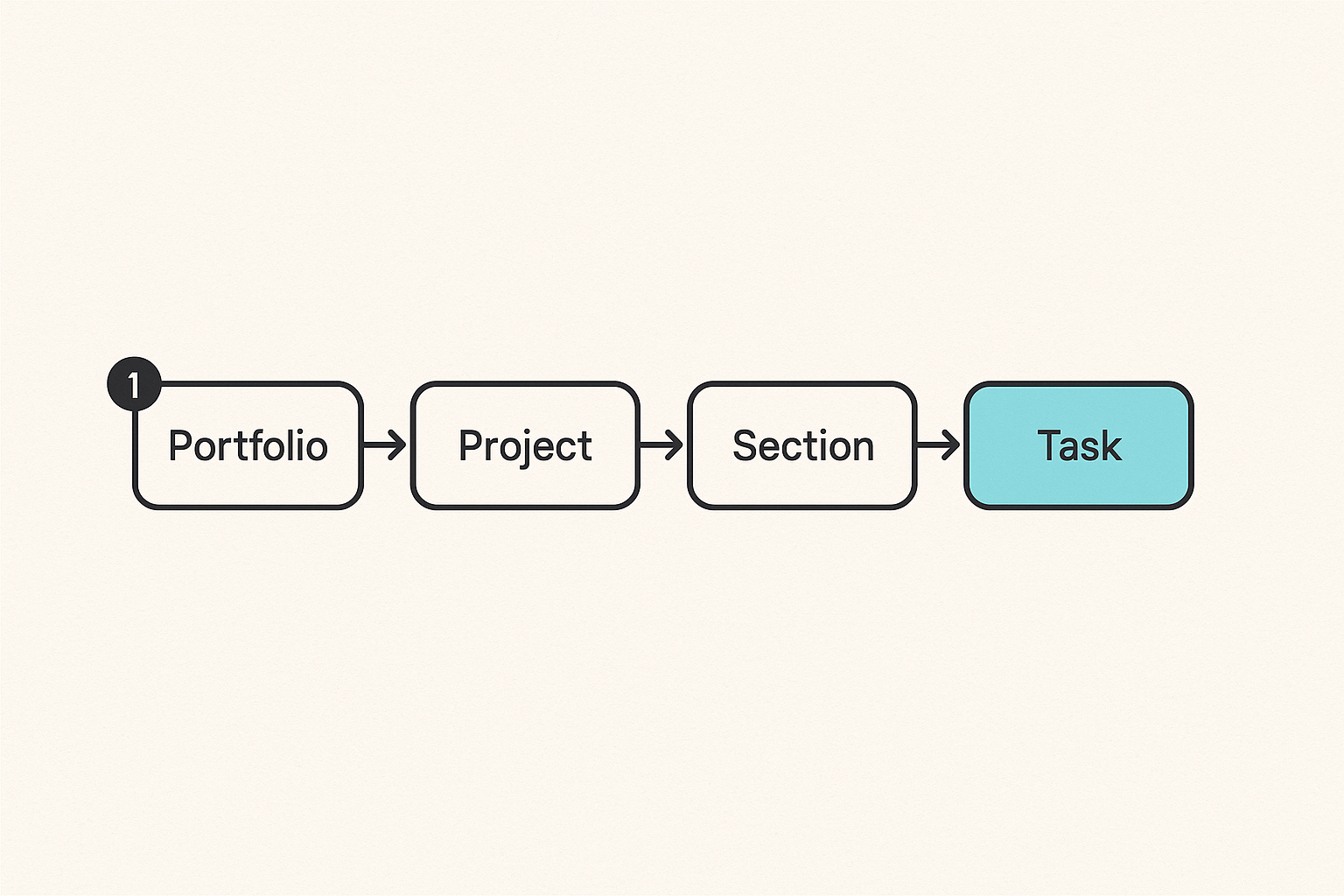
Portfolios, projects, sections, and tasks
A usable Asana workspace needs hierarchy. Without it, people create projects whenever they feel a list getting long. Six months later, nobody knows which projects are active, which are archives, and which were experiments.
Here is a practical model:
- Portfolios track initiatives or departments.
- Projects track repeatable workflows or major outcomes.
- Sections track state or phase.
- Tasks track discrete accountable work.
- Subtasks track supporting actions only when needed.
For example, a SaaS company might have portfolios for Marketing, Product, Customer Operations, and Company Operations. Under Marketing, projects could include Campaign Pipeline, Content Calendar, Website Requests, and Partner Launches. Under Product, projects could include Roadmap Candidates, Release Readiness, Customer Feedback, and Technical Debt Review.
The mistake teams make is using projects for everything. If each campaign, meeting, idea, and support issue becomes a separate project, reporting becomes fragmented. If everything goes into one giant project, ownership becomes vague. The middle path is to create projects around workflows that repeat or outcomes that require cross-functional visibility.
A simple naming convention helps:
- Team prefix: MKT, PROD, CS, OPS.
- Workflow name: Campaign Pipeline, Release Readiness, Customer Escalations.
- Time marker only when useful: Q3 Launches, 2026 Planning.
You do not need a complicated taxonomy. You need one that people can predict.
Custom fields, templates, and views
Custom fields are where Asana becomes operational rather than cosmetic. A task title tells you what the work is. Fields tell you how to manage it.
Useful fields often include:
- Priority: P0, P1, P2, P3.
- Status: Proposed, Approved, Active, Blocked, Review, Done.
- Team: Marketing, Product, CS, Ops.
- Effort: Small, Medium, Large.
- Impact: Low, Medium, High.
- Request type: Bug, Campaign, Content, Customer, Internal.
- Due confidence: Firm, Target, Flexible.
Templates reduce setup drift. If every launch uses a different checklist, the team cannot improve the workflow. A launch template might include positioning, creative, landing page, analytics, enablement, support readiness, and retrospective tasks.
Views should match the question being answered. A board view is useful for state. A list is useful for triage. A timeline is useful for sequencing. A calendar is useful for publishing or launch dates. A dashboard is useful for portfolio review.
Practical rule: Design fields and views around decisions, not preferences. If a field does not change priority, routing, reporting, or accountability, remove it.
What works when implementing Asana project management software
Start with three workflows
The best Asana rollouts are narrow at the beginning. Teams are tempted to map the whole company at once because the software can support it. That usually creates a large workspace with weak habits.
Start with three workflows that are visible, painful, and repeatable. For many SaaS and small business teams, good candidates are:
- Team requests, such as design, content, operations, or data help.
- Delivery projects, such as campaigns, releases, onboarding, or launches.
- Leadership visibility, such as roadmap initiatives, quarterly priorities, or company goals.
This gives you enough surface area to test intake, ownership, status, and reporting without boiling the ocean.
What works is boring but effective: one intake form, one triage owner, one weekly review, one status model, and one template per workflow. After that works for a month, expand.
For teams comparing older agile habits with modern SaaS tooling, the adjacent guide on Pivotal software workflow decisions is useful because it separates process discipline from nostalgia for a specific tool.
Define owners before automations
Automation is useful after the human workflow is clear. It is risky before that.
A healthy setup defines the following owners:
- Workspace owner: manages structure, permissions, and standards.
- Workflow owner: owns a project template and triage rules.
- Task owner: drives an individual task to the next state.
- Decision owner: approves scope, priority, or tradeoffs.
- Reporting owner: keeps leadership views accurate.
Only after that should you automate routing, field updates, due date changes, and status notifications.
The mistake teams make is using automation to hide ambiguity. For example, automatically moving every new request into Active may look efficient, but it destroys triage. Automatically assigning tasks to a manager may create a bottleneck. Automatically notifying a Slack channel on every update may create notification blindness.
Use automation for repeatable transitions. Do not use it to make decisions that nobody has agreed to own.
Related reading from our network: editorial and content teams run into the same approval-lane problem, and this guide to publishing automation software workflow architecture is a useful parallel when Asana is used for content operations.
What fails in practice
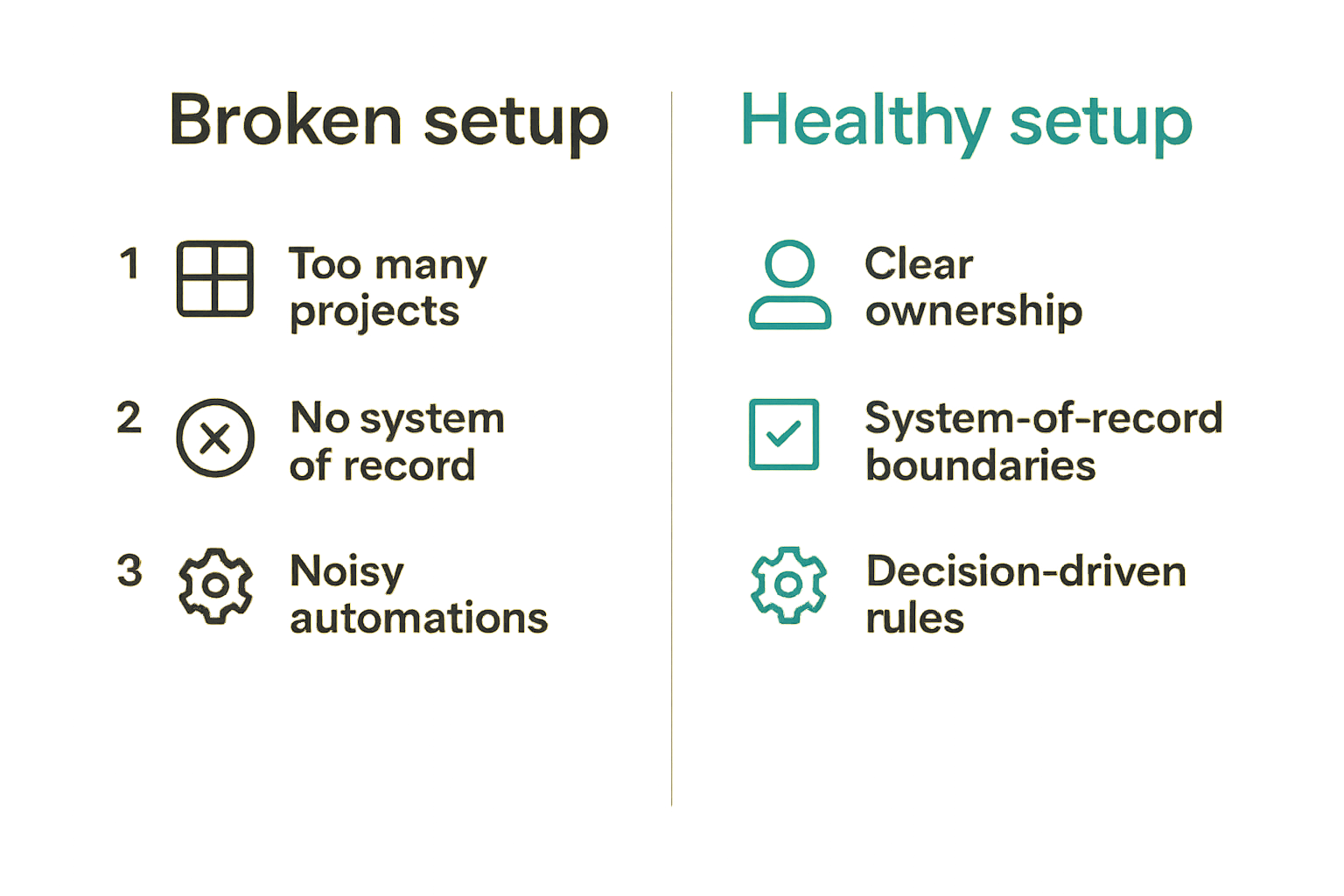
Too many projects and no system of record
What breaks in practice is not usually the Asana feature set. It is the absence of a system of record.
A common failure mode looks like this:
- Product keeps roadmap decisions in a doc.
- Marketing tracks campaigns in Asana.
- Engineering uses an issue tracker.
- Customer success tracks escalations in a CRM.
- Leadership asks for updates in meetings.
- Slack contains the latest answer.
None of these tools are wrong. The problem is that no one knows where the authoritative state lives.
Asana does not need to replace every tool. In many teams, it should not. But it does need a clear boundary. For example, engineering issues may remain in a development tracker, while Asana tracks release coordination, GTM readiness, customer communication, and leadership milestones.
A practical system-of-record rule might be:
- Customer account truth lives in the CRM.
- Code-level work lives in the engineering tracker.
- Cross-functional delivery state lives in Asana.
- Final decisions live in the task, project brief, or linked decision document.
Without this boundary, Asana becomes another place to check instead of the place that reduces checking.
Automations without decision rules
Automation failure usually starts with good intent. Teams want fewer manual updates, so they add rules. New task submitted? Assign it. Due date changed? Notify the channel. Task moved? Update a field. Field changed? Move the task.
The problem is that every automation encodes an operating assumption. If that assumption is wrong, the automation spreads bad state faster.
Common automation failures include:
- Routing every request to one overloaded person.
- Moving blocked work back to active without resolving the blocker.
- Sending too many notifications to channels where no one acts.
- Closing tasks automatically when subtasks are incomplete.
- Updating priority based on requestor urgency instead of business impact.
What works is to document the rule in plain language before building the automation.
Example:
- If request type is Website and priority is P1, assign to Web Ops triage.
- If status changes to Blocked, require blocker reason and blocker owner.
- If launch date is within 10 business days and status is not Review, flag at risk.
- If task is done, require final link or outcome note before archive.
This is not about making Asana complicated. It is about making the workflow explicit.
Asana versus common alternatives
Comparison by workflow shape
Asana competes with a broad set of project management and productivity tools. The right comparison depends less on feature count and more on workflow shape.
| Tool type | Best fit | Where it struggles | Asana comparison |
|---|---|---|---|
| Spreadsheet tracker | Lightweight lists, quick planning, ad hoc reporting | Ownership, notifications, dependencies, repeatability | Asana is stronger for recurring team execution |
| Kanban-first tool | Visual task movement, simple team boards | Portfolio visibility, complex cross-functional planning | Asana is broader across teams and views |
| Issue tracker | Engineering work, bugs, sprint planning, technical workflows | Non-technical stakeholders, campaigns, operations | Asana is better for business-facing coordination |
| All-in-one workspace | Docs, databases, wikis, lightweight tasks | Operational accountability, reminders, workflow enforcement | Asana is more execution-oriented |
| Enterprise PPM tool | Governance, budgeting, large program oversight | Speed, usability, small-team adoption | Asana is easier for mid-sized operating teams |
The practical question is: where does work lose accountability today?
If work gets lost between meetings, Asana may help. If work gets lost inside complex engineering dependencies, an engineering tracker may be better. If work gets lost because documents and decisions are scattered, a workspace or knowledge base may be the missing layer.
When not to choose Asana
Asana is not the best answer for every team.
You may not need Asana if your team has only a handful of people, a simple weekly task list, and no cross-functional dependencies. A shared document or spreadsheet may be enough.
You may want something else if your work is almost entirely software engineering, with pull requests, sprint ceremonies, issue hierarchies, and code-linked automation. Asana can coordinate around that work, but it should not pretend to be the engineering system.
You may also struggle with Asana if leadership is unwilling to use it for status. If executives keep asking for separate slide decks, separate spreadsheets, and separate meeting updates, teams will treat Asana as extra administration.
Practical rule: Do not choose Asana unless managers are willing to stop asking for status in formats that duplicate Asana.
That is the uncomfortable part of project management software. The tool is only as useful as the operating behavior around it.
Implementation workflow for small business teams
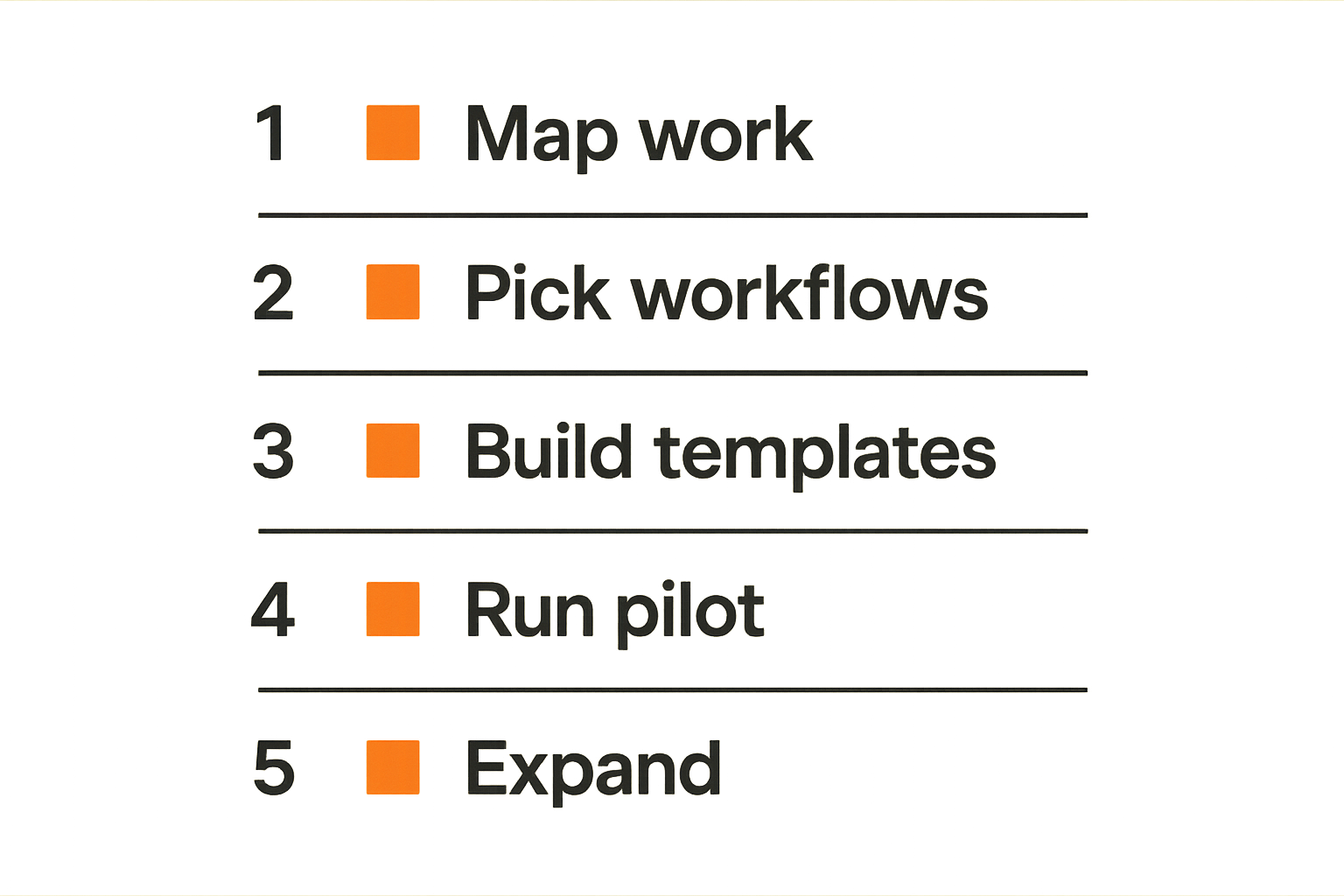
A practical rollout sequence
For small business teams, the rollout should be structured but not heavy. You want enough governance to avoid chaos, without turning a productivity tool into a months-long transformation project.
Use this sequence:
- Map current work paths. Identify how requests enter, where approvals happen, and where updates are currently reported.
- Pick three initial workflows. Choose painful, repeatable workflows with clear owners.
- Define workspace standards. Decide naming, fields, statuses, permissions, and archive rules.
- Build templates and forms. Create minimum viable templates for each selected workflow.
- Run a pilot for two to four weeks. Do real work, not demo work.
- Review failure points. Look for duplicate tasks, unclear owners, missing fields, stale tasks, and bypassed processes.
- Expand only after habits stabilize. Add new teams or workflows after the first workflows are trusted.
The pilot matters because people behave differently in production than in training. A workflow that looks clean in a demo may fail when a customer escalation arrives, a launch date moves, or a founder asks for something urgent.
A simple rollout standard can be written like this:
- Every new request enters through a form or approved project.
- Every active task has one assignee.
- Every blocked task has a blocker owner.
- Every project has a review cadence.
- Every completed project has an archive or retrospective step.
That is enough structure for many teams to get real value.
Migration, permissions, and training
Do not migrate everything. This is one of the most reliable ways to ruin a rollout.
Old trackers contain stale tasks, abandoned ideas, duplicate requests, and decisions that no longer matter. Migrating all of it gives the team a dirty workspace on day one.
Migrate only:
- Active work.
- Recently blocked work that still matters.
- Approved upcoming work.
- Templates or checklists worth preserving.
- Reference links needed for execution.
Permissions should follow operating boundaries. Not everyone needs admin rights. Not every contractor needs access to every portfolio. Not every project should be editable by every stakeholder. Small teams often avoid permissions because they feel unnecessary, then regret it when workspace structure starts drifting.
Training should be workflow-based, not feature-based. Instead of teaching people every Asana feature, teach them how your team uses Asana:
- How to submit a request.
- How to accept ownership.
- How to mark blocked work.
- How to update status.
- How to close work.
- How to find the current answer.
If your company is hiring or reshaping roles, remember that tool ownership is part of role design. The guide on software engineer jobs and workflow design is relevant when project coordination responsibilities sit between product, engineering, and operations.
Metrics that matter after rollout
Cycle time, blockers, and aging work
After rollout, many teams measure the wrong things. They count tasks created, comments posted, or projects launched. Those numbers may show activity, but they do not prove operational improvement.
Better metrics include:
- Cycle time from request to completion.
- Time spent blocked.
- Number of tasks aging past expected review time.
- Percentage of active tasks with a clear owner.
- Percentage of projects with current status updates.
- Work completed by priority category.
- Reopened tasks caused by unclear requirements.
These metrics are useful because they point to workflow problems. If cycle time is long, you can inspect triage, approvals, staffing, or dependencies. If blocked time is high, you can inspect decision ownership. If tasks age without updates, you can inspect review cadence.
A useful dashboard does not need to be complex. For a small team, a weekly view of active work, blocked work, overdue tasks, and at-risk projects may be enough.
The practical question is not whether Asana can generate reports. It can. The question is whether the reports cause better decisions.
Adoption signals that are not vanity metrics
Adoption does not mean everyone logs in. It means the team trusts the system enough to change behavior.
Good adoption signals include:
- People link to Asana tasks instead of asking for status in chat.
- Managers review portfolios before meetings.
- New requests enter through forms instead of side channels.
- Blockers are visible before deadlines slip.
- Completed work includes outcome notes or final links.
- Teams archive old work instead of letting projects rot.
Weak adoption signals include login counts, total comments, and number of tasks created. Those can rise while productivity gets worse.
What breaks in practice is partial adoption. One function uses Asana seriously. Another treats it as optional. Leadership still asks for separate status updates. Eventually the serious users get punished because they maintain the system while others bypass it.
Practical rule: Adoption is real when Asana becomes the shortest path to the current state of work.
Integrations, AI, and automation boundaries
Connect communication without duplicating decisions
Asana integrations can be valuable, especially with chat, email, calendars, file storage, CRM, support, and development tools. But integrations should reduce context switching, not multiply notifications.
A good integration answers one of these questions:
- How does work enter Asana from another system?
- How does Asana notify the right person at the right moment?
- How does Asana link to the authoritative artifact?
- How does Asana update reporting without manual copying?
A bad integration copies everything everywhere. For example, pushing every task update into a chat channel usually creates noise. Sending every email into Asana creates clutter. Syncing every engineering ticket as an Asana task can create duplicate state.
Use integrations to connect systems of record, not erase their boundaries.
For example:
- A customer escalation can originate in support software, then create an Asana task for cross-functional follow-up.
- A launch task can link to the design file, analytics dashboard, and release note draft.
- A sales request can create an intake task, but the account record stays in the CRM.
- A release coordination project can link to engineering tickets without duplicating every ticket.
Related reading from our network: digital product teams face similar operating-system design issues across checkout, delivery, support, and analytics, as discussed in this guide on selling digital products in 2026.
Use AI for summarization, not ownership
AI features in project management software are useful when they compress context. They are risky when teams treat them as a substitute for operating judgment.
Useful AI-assisted workflows include:
- Summarizing long task threads.
- Drafting status updates from recent activity.
- Identifying stale tasks.
- Suggesting next steps from meeting notes.
- Creating first-pass project plans from templates.
Risky workflows include:
- Auto-prioritizing work without business context.
- Assigning owners based only on text.
- Closing tasks without human review.
- Generating status updates that hide uncertainty.
- Creating many tasks from vague notes.
The practical rule is simple: AI can help describe work, but humans still own commitments.
This matters because project management failure is often political, not clerical. A task is not blocked because the summary is too long. It is blocked because two teams need a decision. A deadline is not missed because the task title was poorly written. It is missed because priority, capacity, or scope was unresolved.
AI can make Asana faster. It cannot make an unclear organization accountable by itself.
Buying decision and product fit for 2026
Cost, governance, and rollout risk
When evaluating Asana project management software in 2026, do not start with the pricing page alone. Start with the operating cost.
Ask these questions:
- Who will own workspace design?
- Which workflows will launch first?
- Which teams need paid seats?
- Which guests or vendors need access?
- What integrations are required?
- What reporting does leadership expect?
- What existing tools will remain systems of record?
- What behavior must change for Asana to be worth it?
The subscription cost matters, but rollout risk often matters more. A cheap tool implemented badly becomes expensive through meetings, rework, missed handoffs, and duplicate reporting. A more expensive tool implemented clearly can pay for itself if it removes operational drag.
For SaaS buyers, the key is to evaluate fit by workflow maturity. If your team is still deciding how work should move, start small. If your team already has clear processes and needs better coordination, Asana can scale across functions. If your team needs strict enterprise governance, audit controls, budgeting, or complex resource planning, evaluate whether Asana is enough or whether it should sit alongside another system.
Where saasrow.com fits
saasrow.com is built for readers who want practical articles, guides, and insights about software and productivity. That means we treat tools like Asana as operating choices, not trend objects.
The useful buying question is not whether Asana is popular. Popular software can still be a poor fit for your workflow. The useful question is whether Asana project management software matches how your team accepts work, assigns responsibility, makes decisions, reports progress, and improves over time.
A grounded evaluation should include:
- Your current workflow map.
- Your three most painful coordination gaps.
- Your must-have integrations.
- Your reporting needs.
- Your permission model.
- Your rollout owner.
- Your criteria for success after 30, 60, and 90 days.
That is the lens we use at saasrow.com: compare tools by how they behave in real workflows, not by who has the longest feature list.
Closing checklist for Asana project management software
The decision checklist
Before choosing or expanding Asana, run this checklist with your team:
- Do we know which workflows Asana will own?
- Do we know which tools remain systems of record?
- Do we have one intake path for each major request type?
- Does every active task have one accountable owner?
- Are priorities defined in business terms?
- Do blocked tasks require a blocker owner?
- Are project templates standardized enough to improve?
- Will managers use Asana for status instead of duplicate reports?
- Do we have a rollout owner with authority to enforce standards?
- Do we know what success looks like after the first month?
If the answer is no to most of these, the next step is not more software research. The next step is workflow design.
If the answer is yes, Asana becomes much more interesting. It can give your team a shared execution layer across campaigns, launches, requests, operations, and leadership visibility.
Final operating rule
The mistake teams make is treating Asana as a place where tasks go. The better approach is to treat it as a place where work changes state.
That sounds subtle, but it changes implementation. You stop asking whether the board looks nice. You start asking whether a request can be submitted, triaged, approved, assigned, delivered, reviewed, and archived without disappearing into side conversations.
Asana project management software works when the workflow is explicit, ownership is real, and reporting comes from the same system where work happens.
Try saasrow.com
saasrow.com shares practical articles, guides, and insights about software and productivity for teams that want to choose tools wisely and improve workflows. Try saasrow.com